AEM Frontend Architecture Guide: Classic, JAMStack, or EDS?
 Daniel Strmečki
Choosing the right frontend architecture in Adobe Experience Manager (AEM) is no longer just a technical decision; it’s a strategic one. Whether you opt for a classic AEM server-side component approach with HTL, a modern JAMStack implementation with frameworks like React and Next.js, or Adobe's Edge Delivery Services (EDS), each choice impacts time-to-market, SEO, authoring experience, and scalability. This guide will help you align your frontend architecture with your business goals and future-proof your digital experiences.
With AEM as a Cloud Service (AEMaaCS), Adobe has shifted towards a more composable and scalable content delivery model. The frontend layer is now a critical part of the decision-making process, influencing authoring workflows, site performance, operations, and integration flexibility. Businesses should choose an architecture that aligns with their operational needs and long-term digital strategies.
Three Frontend Models
There are no silver bullet solutions in IT, and the same is true for choosing your AEM frontend architecture. Different business cases and operational needs will benefit from different approaches. Understanding the nuances of each model is key to making the right choice. When planning your AEM frontend strategy, it’s essential to understand the core delivery models available. Each approach offers distinct advantages in terms of authoring experience, scalability, and technical flexibility. Let’s break down the three primary models you’ll encounter.
Classic
Classic implementations are built using AEM’s HTL (HTML Template Language or formerly called Sightly) and Sling Models, rendering content server-side. This approach provides tight integration with AEM’s backend, but also requires frontend developers to possess specific AEM knowledge.
The classic implementation approach supports two authoring options: the classic Page Editor and the new Universal Editor. While the classic Page Editor offers rich visual authoring and endless customization options, Adobe’s innovation focus has shifted towards Universal Editor. As a result, continuing with the Page Editor might not be the ideal long-term strategy for businesses aiming to leverage Adobe’s future innovations.
This approach is recommended for:
- Existing AEM sites that heavily depend on classic AEM features like experience fragments, editable templates, style system, layout containers, or personalization with ContextHub (Page Editor).
- Existing AEM sites using classic HTL components, looking to maintain current workflows and heavily customize the editing experience (Page Editor).
- Existing AEM sites using classic HTL components, looking to maintain current workflows but switch to a modern editing experience (Universal Editor).
Building performant websites using the Classic approach is certainly possible, but it requires significantly more development effort compared to JAMStack or EDS. Performance optimization tasks such as fine-tuning caching strategies and optimizing Core Web Vitals need to be handled manually by development teams, whereas modern approaches provide most of these optimizations out of the box.
JAMStack
JAMStack implementations leverage AEM’s new Universal Editor and headless capabilities, delivering content via APIs to frontend applications built with modern frameworks like Next.js. This decoupled architecture gives frontend developers full control over the user experience, allowing them to create highly interactive and performant websites.
Developers work with a modern frontend framework that is widely adopted and supported by a large community. This environment offers extensive libraries and tooling (SCSS, Tailwind, Storybook), promoting React-based, atomic, and modular component development with TypeScript support, making it a developer-friendly choice.
JAMStack prefers static site generation with server-side components for performance optimization, while it supports client-side components where needed. However, this approach requires a dedicated environment to run on (AWS/Azure), and additional Dev/Ops efforts not covered by Adobe.
This approach is recommended for:
- Enterprise site implementations requiring custom frontend experiences with deep integrations to multiple data sources and services.
- Businesses that prioritize developer autonomy and modern frontend frameworks (existing React/Next.js know-how in the team).
- Businesses looking to implement highly reusable frontend components based on a design system.
JAMStack sites achieve excellent performance and SEO through built-in caching and revalidation strategies, but success depends on the development team's expertise in frontend optimization, AEM integration, and caching strategies.
EDS
Edge Delivery Services (EDS) is Adobe’s own modern approach for scalable and high-performance frontend delivery. EDS leverages Adobe’s CDN to deliver static HTML and assets optimized for Core Web Vitals.
With EDS, the HTML is server-side rendered by Adobe's infrastructure and cannot be modified server-side by the development team. Developers may only decorate the output HTML using vanilla JavaScript and CSS. To maintain excellent site performance, Adobe doesn't recommend using any heavy frontend frameworks like React. These constraints may pose challenges for businesses requiring heavier backend customizations or implementing complex design systems. EDS sites rely fully on Adobe’s infrastructure, benefiting from direct support and updates that minimize maintenance overhead.
Authors can manage content through two methods: the Universal Editor for visual, in-context editing, or Document Authoring for large-scale content operations where layout control is minimal.
This approach is recommended for:
- Businesses managing high volumes of structured content that require a fast go-to-market.
- Enterprises aiming to align with Adobe’s composable DXP vision and benefit from ongoing Adobe innovations.
- Organizations seeking simplified, scalable authoring workflows with minimal onboarding efforts (Document Authoring).
- Organizations relying on structured pages reused across multiple geographies with authors used to visual content editing (Universal Editor).
EDS ensures optimized delivery and strong Core Web Vitals out of the box through Adobe’s edge caching and the layered rendering approach. However, this also means being tightly coupled with Adobe’s ecosystem, which can limit flexibility in switching to alternative frontend delivery platforms in the future. On the other side, EDS offers seamless integration with Adobe Commerce with out-of-the-box APIs and components.
Key Business Considerations
When selecting a frontend architecture for AEM, it's essential to look beyond technical capabilities and consider how each model impacts your digital operations. Below, we break down the most important business criteria to help you evaluate what fits your organization best.
Authoring Experience
The authoring experience determines how efficiently teams can create, update, and manage content.
- Classic: Page Editor offers visual, in-context editing with full control, allowing for extensive customization and use of AEM's editable templates and style system. Universal Editor is supported but enforces more structure and fewer customization options.
- JAMStack: Authors work with Universal Editor to visually, in-context update structured content delivered via APIs. While layout is controlled by the frontend codebase, components can be added, edited, and rearranged. This model works well when layout consistency is important and when developers own the design implementation.
- EDS: Offers both visual, in-context editing with Universal Editor and a simpler and faster-to-implement option with Document Authoring. Universal Editor is best for structured content with visual editing capabilities, while Document Authoring is better for high-volume operations with minimal layout control.
Time-to-Market
Speed of delivery is critical for campaign responsiveness and scaling content operations.
- Classic: Allows fast authoring of already developed components/pages, but can be significantly slowed down when development is required.
- JAMStack: Allows fast authoring of already developed components/pages. Frontend delivery pipelines are more flexible and faster, but still dependent on team bandwidth.
- EDS: Fastest option, especially with Document Authoring. Authors have more control and do not need to rely on predefined page templates.
Scalability
Your architecture's ability to support content growth and team expansion matters.
- Classic: Can support large sites, but requires substantial developer support and performance tuning.
- JAMStack: Highly scalable with cloud infrastructure and CI/CD, but requires additional cloud hosting and DevOps efforts.
- EDS: Highly scalable with cloud infrastructure fully managed by Adobe.
Future-Proofing
When investing in a frontend architecture, it’s essential to look not only at today’s needs but also at the trajectory of Adobe’s ecosystem and your organization's long-term digital strategy.
- Classic (Page Editor): Adobe has signaled that the Page Editor will eventually be replaced by the Universal Editor. While still fully supported, it's no longer the focus of innovation and may not benefit from future updates.
- Classic (with Universal Editor): Can serve as a transitional model, allowing organizations to modernize gradually. However, it still requires maintaining classic AEM components that cannot be reused much for later JAMstack/EDS migrations.
- JAMStack (Next.js): Aligned with MACH architecture principles and modern development practices, JAMStack is a future-resilient option, especially for organizations with strong frontend and DevOps teams. However, success depends on internal ability to build and maintain performance and scalability.
- EDS: This is Adobe’s clear strategic direction. With innovations in Core Web Vitals, personalization, edge rendering, and content governance focused here, EDS (with Universal Editor or Document Authoring) is the most future-aligned path for enterprises relying heavily on Adobe.
Technical Decision Points
Choosing a frontend architecture for AEM also involves several technical trade-offs that impact development workflows, infrastructure, and performance outcomes. Here's how each option aligns with common technical decision points.
Control
- Classic: Provides full frontend control via HTL and Sling Models. Suitable for projects where frontend and backend are tightly integrated.
- JAMStack: Offers the highest flexibility for frontend developers using modern frameworks like Next.js. Ideal for highly customized component development based on a design system.
- EDS: HTML is server-rendered by Adobe, but cannot be customized server-side. Developers decorate the output with vanilla JavaScript and CSS, making it less suitable for advanced customization.
Performance
- Classic: Good Core Web Vitals can be achieved, but usually require a lot of manual optimization and performance tuning.
- JAMStack: Delivers high performance with modern CDN strategies and static site generation, but requires a well-implemented DevOps pipeline and cache invalidation integrated with AEM.
- EDS: Adobe-optimized for Core Web Vitals, fast by default with minimal tuning needed.
Integrations
- Classic: Integrates with external systems via frontend or AEM backend (Sling Models, OSGi services). Effective but tightly coupled and less flexible.
- JAMStack: Excels in integrating multiple different APIs and headless services, enabling composable architectures with great performance thanks to the incremental static site generation feature.
- EDS: Primarily designed for Adobe-hosted structured content. Integrations with external sources are possible but mostly rely on the frontend side.
DevOps
- Classic: Uses Adobe Cloud Manager for builds and deployments of both backend and frontend.
- JAMStack: Uses Adobe Cloud Manager for backend builds and deployments, but requires a custom DevOps setup for frontend. Offers more control and faster frontend deployment.
- EDS: Fully managed by Adobe with zero DevOps overhead, allowing teams to focus on content and frontend logic. Offers less control but very fast frontend deployments.
Decision Framework
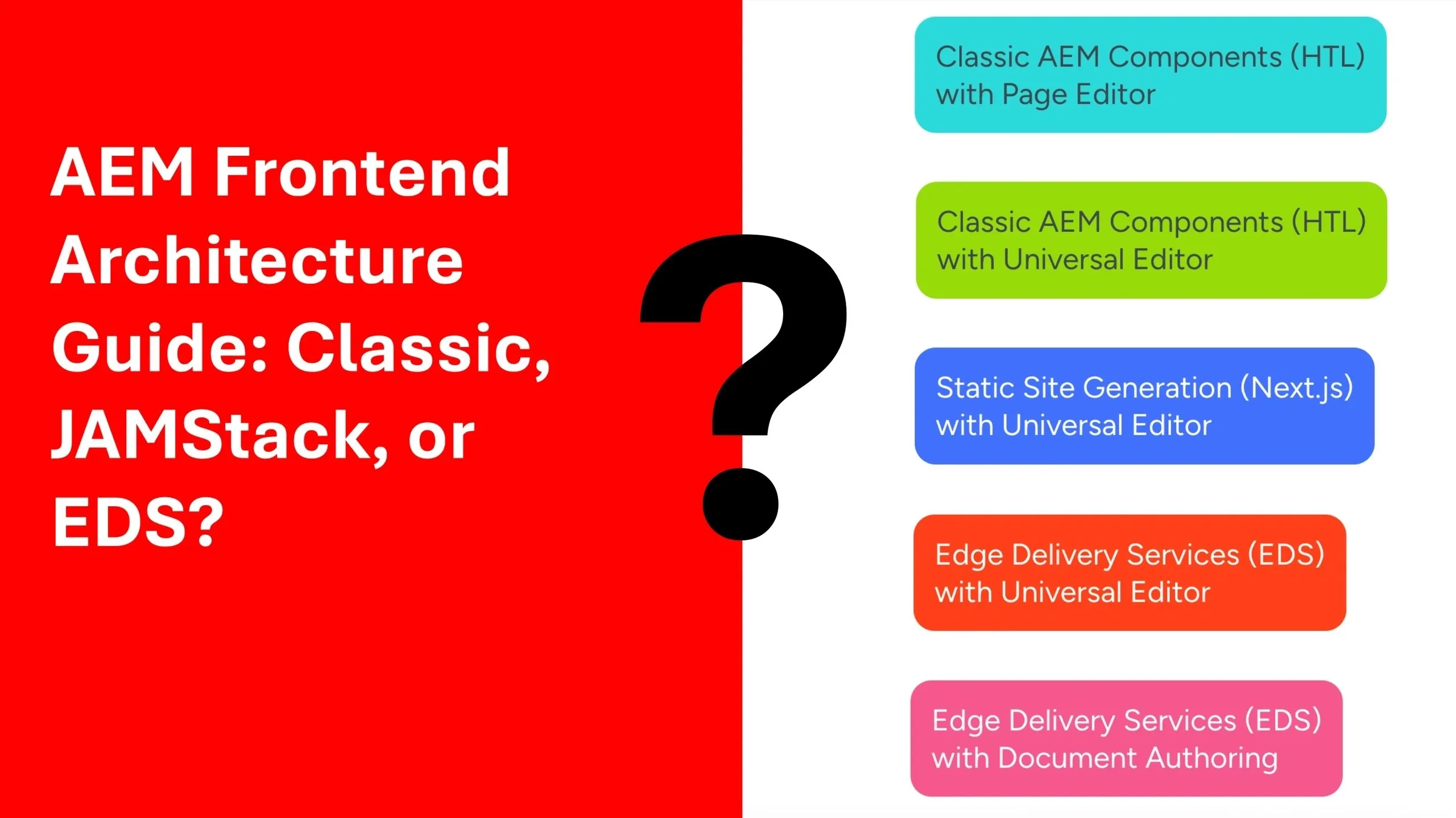
To simplify your decision process, consider the following recommendations across all five options:
- Classic with Page Editor: Good for existing AEM projects that rely on editable templates, layout containers, style system, or personalization features like ContextHub. Suitable for teams deeply integrated into AEM workflows and requiring heavy customization.
- Classic with Universal Editor: Good for teams modernizing legacy implementations who want to retain HTL components while adopting Adobe’s next-generation authoring interface. A good interim step toward more composable models.
- JAMStack with Universal Editor: Best for projects demanding frontend flexibility, reusability, composability, and integration with multiple third-party systems. Suitable for teams with strong frontend and DevOps know-how.
- EDS with Universal Editor: Best for structured content scenarios where authors benefit from visual, in-context editing and reusable component schemas. Good fit for businesses aligning with Adobe’s composable DXP vision.
- EDS with Document Authoring: Ideal for high-volume content production with minimal layout requirements. Unlocks fast author enablement and new content creation and publishing with minimal reliance on developers.
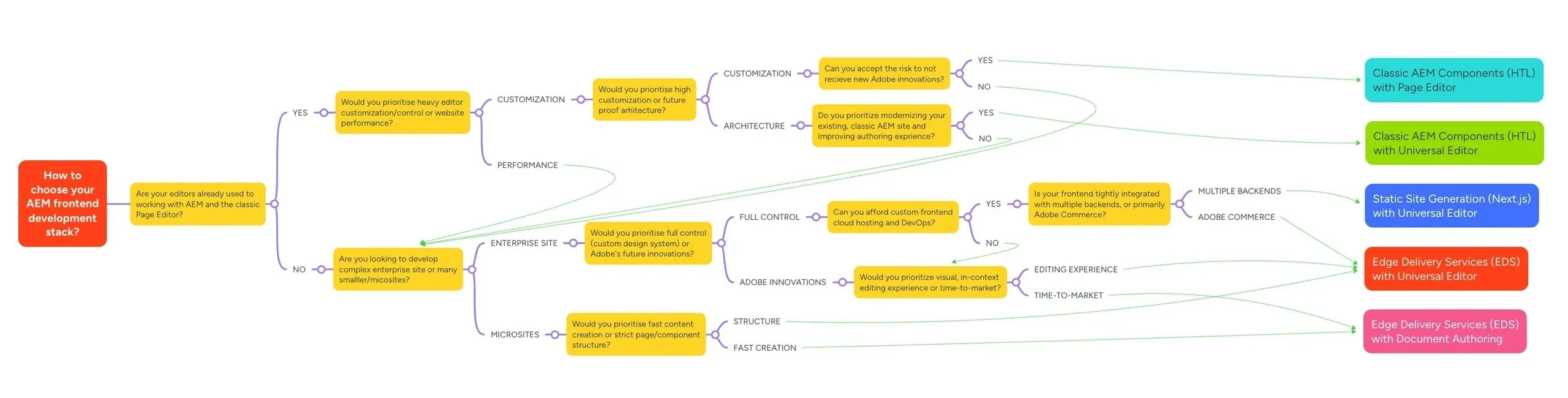
Refer to the decision tree diagram below for a more comprehensive visual guide for choosing between the different AEM frontend architecture options. You can also explore the MindMeister version here.
Conclusion
Adobe's roadmap clearly indicates a push towards composable architectures, with EDS and Universal Editor at the core. Businesses aiming for scalability, reduced DevOps overhead, and performance optimization should align their strategies with this direction. JAMStack remains a strong option for organizations with high digital maturity requiring full frontend autonomy, more control, and reusability.
The choice between Classic, JAMStack, and EDS frontend architectures in AEM isn’t a one-size-fits-all decision. It requires a clear understanding of business goals, authoring workflows, and technical capabilities. By aligning your frontend strategy with your long-term vision, you can ensure a scalable, performant, and future-ready digital presence.
Whether you're navigating Classic legacy architectures, exploring JAMStack flexibility, or embracing Adobe's Edge Delivery vision, making the right choice starts with a clear roadmap. Reach out to our team for a personalized consultation or a hands-on architecture workshop, including live demos.