What AEM Upgrades to Prioritise in 2025?
 Daniel Strmečki

As the digital landscape evolves, Adobe Experience Manager (AEM) project owners need to prioritize strategic investments to stay ahead. With Adobe offering new capabilities and evolving best practices, clients need to decide where to spend their allocated development budgets. On large, complex, enterprise projects, not everything can be achieved at once and migrations require proper planning and execution time. Therefore, teams should prioritize features that bring the most business value but also ensure a technically stable and future-proof solution. In this article, we’ll explore key upgrade areas where AEM teams should focus their time in 2025.
Cloud Migration - AEMaaCS
Adobe recently announced a new version update for on-premise installations: AEM 6.6, also known as AEM 6.5 2025 Edition. Organizations currently utilizing AEM on-premise should transition to AEM 6.6 to benefit from the latest security and performance enhancements. However, it's essential to note that while AEM 6.6 addresses critical updates and the Java 17 version upgrade, certain advanced features available in AEM as a Cloud Service (AEMaaCS) are still not present in the new on-premise version.
AEM 6.6 is great news for industries with regulatory requirements like banking, healthcare, and government, which may have data residency or compliance mandates that prohibit storing content in Adobe’s cloud. However, for everyone else, I strongly advise highly prioritizing cloud migration. Migrating to AEMaaCS might take significant development time, but it also saves clients from the trouble of any future version migrations. Each migration to a new on-premise version can also be quite time-consuming. On AEMaaCS, Adobe updates are pushed automatically at least once a month and rarely cause any issues or conflict with custom-deployed code.
In terms of performance, clients on AEMaaCS benefit from auto-scaling, improved uptime, and included CDN. In addition, AEMaaCS can bring more efficiency and cost optimization, as Adobe manages the cloud infrastructure, reducing or even eliminating the need for dedicated DevOps teams. Cloud eliminates the need for on-prem data centers and subscription-based cloud models usually make budgeting easier. Teams can deploy features faster with cloud automation tools. CI/CD workflows are implemented with Cloud Manager and offer great integration options with GitHub. Regular feature and security updates will keep your AEM secure and provide access to the latest innovations, so you never have to think about AEM version upgrades again.
Java and Framework Upgrades
Java 21 is now enabled for all AEMaaCS customers, along with the rollout of a new SonarQube version. Released in September 2023, Java 21 will receive Premier Support until September 2028 and Extended Support until September 2031. It makes perfect sense to be up-to-date with the core programming language used in a platform like AEM, as it also provides important security and performance updates, just on a lower level.
As Java is backward compatible, the upgrade process should be smooth, requiring only a few code changes. That means teams can upgrade to Java 21 and keep using the same code written for Java 11. Then, teams can gradually introduce the newly available syntax and APIs. Refer to our previous article to find which new features developers can benefit from in Java 21. If you are already on AEMaaCS then make sure to plan for a Java upgrade. In case you are not on AEMaaCS, but plan a cloud migration project, then make sure to include the Java upgrade in the cloud migration project.
Keeping frontend frameworks like React up-to-date is just as important as keeping Java updated, but the reasons and impact can vary. New frontend framework versions usually solve many security vulnerabilities and improve performance. For example, React 18 brings faster reconciliation, rendering, and reduced memory leaks, therefore enhancing user experience. Modern features like hooks, server components, suspense, and others, simplify front-end development. Introducing additional layers like Next.js with static site generation can significantly improve caching and site performance, having a great positive impact on SEO. Here, I cannot make a general recommendation, but each team should evaluate the benefits and impact of upgrading their frontend framework. Then, the value and impact can be compared and prioritized vs the other backlog items. However, keep in mind that staying on a very old framework version is never a good strategy.
Refactoring and Modernizing Codebases
In case you are working on a very old AEM project, your codebase might need some modernization and refactoring effort. These can be very hard to prioritize with the business units, as most of the time effort is significant but doesn't bring any immediate business value. However, keeping your project healthy and future-proof enables teams to stay efficient and bring future business value faster.
The best time to do refactoring work is always, step by step, with every iteration and every change. I was never a fan of planning big refactoring efforts or iterations where the complete team focuses only on modernizing the codebase. Therefore, the best advice I can give is to think about and plan for some refactoring work to be done in every iteration. Refactoring needs to be a part of every new feature development. A good practice is to bring up two or three cleanup or refactoring tasks in every refinement.
If you find yourself in a situation where you need to invest months only on refactoring work to modernize your codebase, then this is an obvious sign of either incompetent development work or incompetent technical leadership. Architects and senior developers should continuously plan for small refactoring efforts. These are then presented and discussed with the project owner to define priorities. Great developers will simply execute refactoring work all the time, without even mentioning it. On every feature they are working on, they make small improvements, without anyone telling them to do so. As CMS projects are usually strategic for organizations, having non-competent developers or not addressing technical debt may be extremely costly and even lead the complete project to a point of no return.
New CF Editor and Universal Editor Migration
The new Content Fragment (CF) Editor and Universal Editor are two recent advancements in the AEM world that offer a more modern and flexible approach to content authoring. These new editors are designed to improve the editor experience, enhance performance, and provide better flexibility. Both editors represent a shift toward a more modern, flexible, headless, and cloud-native approach to content creation. These editors are built cloud-native, providing scalability, continuous updates, and better long-term support. Migrating to the new editors ensures that clients stay up to date with the latest AEM features and enhancements. Although we do expect the old Page and CF editors to be available for some time, 2025 is the year to at least start thinking about migration.
It is simpler to start with the migration to the new CF Editor. The new CF Editor is an authoring tool designed specifically for working with reusable, structured pieces of content without presentation - Content Fragments. All CF models created using the OOTB input fields in the CF Model Editor should also work in the new CF editor. Therefore, the migration effort involved will strictly depend on the number of customizations made in the CF models or custom JS code created for the old editor. Customizations can be done in the new CF Editor as well, but only for the extension points made available by Adobe. In the new CF editor, developers don't have direct access to the editor DOM, and cannot simply introduce custom JS or CSS code. Instead, they need to develop Adobe.io plugins, use Adobe-provided APIs, and publish their plugins using the new Extension Manager. Although this does sound like a better architecture, clients with lots of customizations may find it more difficult or even impossible to achieve some customizations in the new CF editor. Therefore, some major changes in the CF models might be required to rely more on the OOTB functionalities.
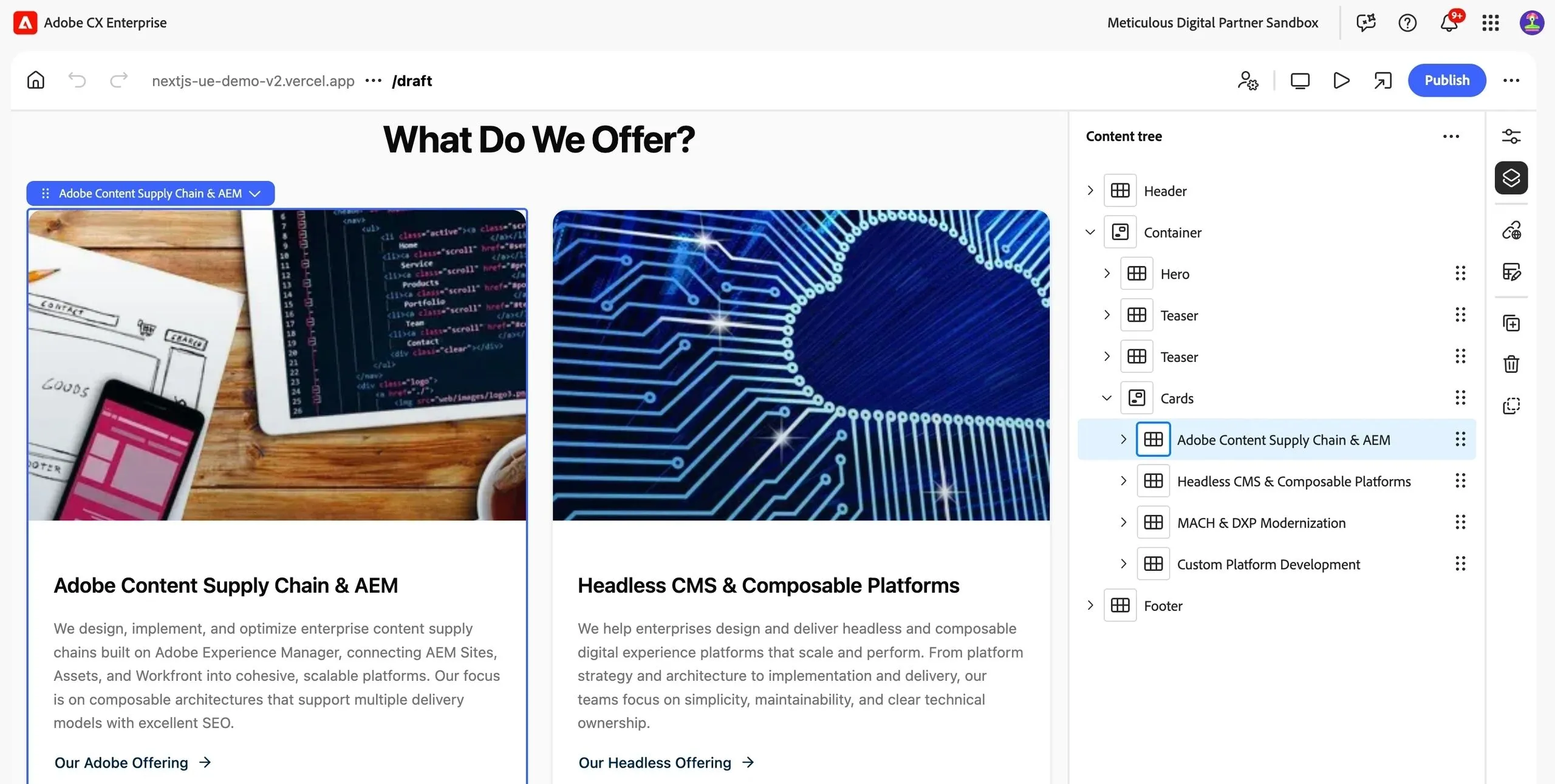
The Universal Editor is a visual editor for AEM Sites that enables editors to perform WYSIWYG editing of any headless or headful experience. It was built to support Adobe Edge Delivery and any custom headless/decoupled/hybrid architecture with frontend frameworks like React or Next.js. The Universal Editor relies fully on HTML standards like scripts and data attributes, which makes it truly universal. It can work with any frontend framework and any content source (AEM, documents, or even a different CMS). Universal Editor provides great WYSIWYG editorial experience for not only sites but also content and experience fragments. Similar to the new CF editor, Universal Editor provides extension points for developers to introduce custom plugins. Most older AEM projects have more customizations done for their sites/components, than for content fragments. Therefore, it makes sense to do the Universal Editor migration after the new CF Editor migration, to leverage the learnings gained. Adobe mentions that Universal Editor intends to eventually supersede the Page Editor, so migration does make sense for all long-term AEM projects. However, it is still early days for the Universal Editor so it may also be a good strategy to plan the migration for 2026, when more features and customization options are available.
Migration to Edge Delivery or JAMstack
If your frontend layer requires decoupling or an upgrade to deliver content globally with better mobile performance, then Edge Delivery Services or a custom JAMstack solution may be worth prioritizing. However, to leverage these solutions you should first switch to the new Universal Editor. In theory, it is possible to do it with older editors, like the SPA editor, but it isn’t advisable as these will get deprecated. Also, keep in mind that switching to these modern front-end solutions will require a complete rebuild of the front-end code and all components.
Edge Delivery Services (EDS) is decoupled from the content source and can ingest content from different content sources, including AEM. EDS complements AEM Publisher by offloading static content delivery to the edge, ensuring faster access and reducing the load on the publisher. It leverages smart routing, image optimization, and edge computing to ensure fast content delivery with minimal delays. EDS can significantly improve your Google PageSpeed scores, particularly in the area of mobile performance. To achieve the best performance, Adobe recommends writing EDS components/blocks with plain JavaScript. If you prefer to decouple the frontend delivery layer from Adobe and leverage a frontend framework like Next.js, then a custom JAMstack setup might be more suitable for you.
Clients with high digital maturity might prefer separating their CMS vendor from the experience/front-end layer and the CDN vendor. This can be achieved with a custom JAMstack solution, which focuses on pre-building all HTML/JS files, so only a small percentage of user requests need to reach the backend servers. The pre-built content can be pushed to a CDN like Vercel, Netlify, Akamai, or CloudFront to achieve maximum performance. Such a JAMstack architecture can achieve similar Google PageSpeed scores as EDS. Adobe's Universal Editor makes this possible, through seamless integration to any front-end. Keep in mind that Next.js is a server-side solution and requires hosting outside of Adobe cloud. Refer to our previous article for a demo of Next.js with AEMaaCS and Universal Editor.
Since this migration requires significant planning and development efforts, make sure to evaluate the effort vs value it brings to your sites. High-speed delivery and top performance scores are usually more important for B2C websites with global reach, looking to maximize user experience and SEO. Although PageSpeed scores do impact SEO, creating a great user experience with relevant content is of greater importance.
SEO and PageSpeed Optimization
Clients that need to achieve good SEO and mobile performance for their sites, but do not have the budget or need to switch their projects to EDS or Next.js, can still optimize their current solutions. Most AEM implementations I've seen struggling with mobile performance scores use either client-side rendering or non-optimal image delivery.
In such cases, the LCP metric is usually the most problematic one. Largest Contentful Paint (LCP) measures how long it takes for the largest visible element (usually a hero image) on a webpage to load and become visible to the end user. However, there are several technical techniques to resolve this problem:
- Server-side render the component containing the LCP, using a standard AEM component, regardless of how other components are rendered.
- Compress and serve images in modern formats like WebP to reduce their size and improve load time.
- Use the preload HTML attribute with a high fetch priority for the LCP image.
- Lazy-load non-essential images and media to prevent them from blocking the main content.
- Defer loading of all CSS, JavaScript, and fonts that aren't essential for the initial page render.
After fixing the LCP score, we can also perform additional performance optimization on any frontend stack:
- Reduce the number of HTML elements used on the page.
- Refactor components to avoid layout shifting as much as possible.
- Load only the necessary JS and CSS files required for the components actually used on a page.
- Reduce the number of external resources that need to be downloaded on page load.
- Minimize the use of inline CSS and JavaScript.
- Minimize the number of style changes that trigger a DOM repaint.
Performing such optimization on complex AEM projects is not as simple as it may sound. Every front-end developer knows how to create a new component, but only the best front-end developers can optimize a complex, non-performing site. In case your previous SEO or PageSpeed optimization efforts failed, consider doing a POC with a third party specialized in front-end optimization.
Conclusion
If you are not dealing with regulatory requirements preventing it, prioritize migration to AEMaaCS on top. After 5 years of working on the Cloud, I promise you will never think about going back. In case your older AEM project is in desperate need of modernization, consider migrating to Universal Editor and a highly performant front-end solution like EDS or Next.js. However, if your budget doesn't allow starting a big modernization project this year, you can still probably do some SEO and PageSpeed optimizations, as well as at least try to migrate to the new CF editor. I hope you find these suggestions helpful for ensuring a future-proof AEM solution, that will delight both your editors and end users. We are happy to help you on the journey, get in touch to start your free consultation.