AEM Universal Editor: Solving Stale Previews with Pod Affinity
 Daniel Strmečki
Adobe Experience Manager (AEM) Universal Editor introduces a modern approach to visual content authoring, allowing enterprises to combine AEM's content management capabilities with decoupled frontend applications built using frameworks such as Next.js or Astro. This provides greater flexibility in how digital experiences are developed and delivered, without sacrificing the visual editing capabilities that content authors expect from an enterprise CMS.
However, separating the frontend application from AEM also introduces new architectural challenges. Content editing, rendering, caching, and request routing are now handled by different systems, often running on completely separate infrastructure. While this separation is one of the main advantages of a decoupled architecture, it also means that developers need to understand how these systems interact, particularly during content authoring.
In one of our recent implementations using AEMaaCS, Universal Editor, and Next.js, we encountered an issue where content changes were successfully saved in AEM, but the Universal Editor preview occasionally continued displaying outdated content. Some changes appeared immediately, while others required additional refreshes or a short delay before becoming visible.
At first glance, this looked like a typical frontend caching problem. However, after investigating the request flow, we identified a different root cause: Universal Editor and Next.js were communicating with different AEM Author pods.
The problem was not that AEM failed to save the content or that Next.js was returning cached data. The problem was that AEMaaCS runs multiple Author pods, and content changes are not immediately visible across all of them. In our experience, it typically takes around 1–2 seconds for updated content to become visible across the Author pods. During this short window, Next.js could retrieve outdated content if its request reached a different pod than the one handling the update.
When Saving Content Doesn't Update the Preview
In a traditional AEM Sites implementation, content editing and rendering are tightly integrated within AEM. The Page Editor operates against the AEM Author environment, and the rendering process is handled by AEM itself. With Universal Editor and a decoupled frontend, the architecture is different. Universal Editor is responsible for persisting content changes through AEM, while the frontend application independently retrieves content through APIs and renders the page.
In our implementation, Next.js uses server-side rendering to generate the authoring preview. Whenever Universal Editor saves a content change and refreshes the preview, Next.js makes a new API request to AEM Author to retrieve the latest content. This works as expected when both requests reach an AEM Author pod where the updated content is available. However, AEMaaCS runs on a distributed infrastructure with multiple Author pods, and content changes are not necessarily visible across all pods immediately.
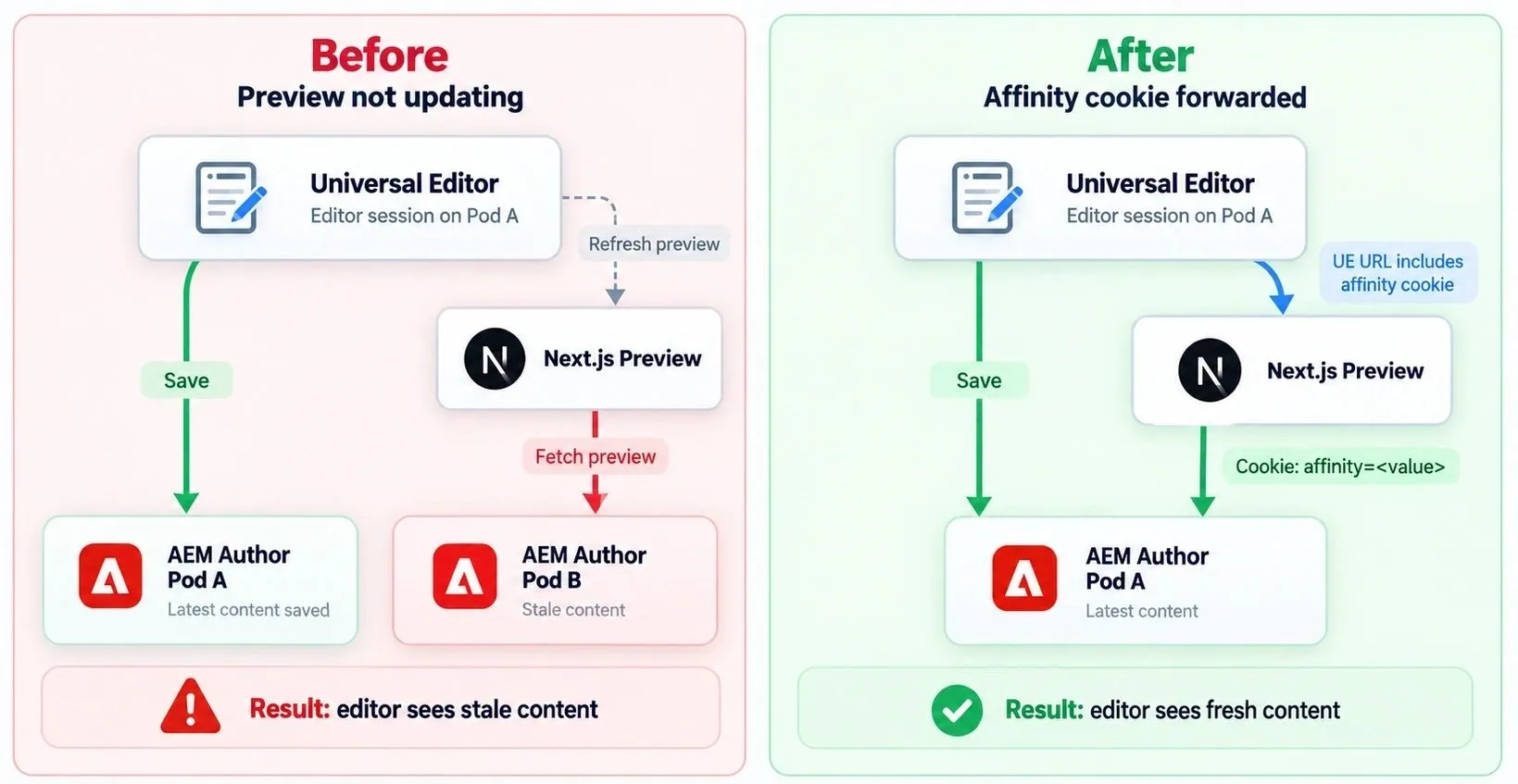
Consider a scenario where Universal Editor saves a change through AEM Author Pod A. The update is successfully persisted, and the latest content is available on that pod. Universal Editor then refreshes the Next.js preview, triggering a new server-side request to AEM Author. Since this request originates from the Next.js application rather than the editor's browser, it can be routed independently to a different AEM Author pod. If the request reaches Pod B before the content change becomes visible there, Next.js retrieves and renders the previous version of the content.
The result is an inconsistent authoring experience. The editor reports a successful save, but the preview continues displaying outdated content. This behavior is particularly difficult to troubleshoot because it is intermittent. Depending on which pod handles the request and how quickly content changes become available across the environment, the same operation might work correctly one moment and fail the next.
It is also easy to focus the investigation on the wrong layer. When a server-rendered Next.js application displays outdated content, caching is an obvious suspect. However, disabling application-level caching does not solve the problem if the underlying AEM API itself returns an outdated response. In our case, the issue was ultimately related to request routing and content consistency between AEM Author pods rather than frontend caching.
Understanding AEM Pod Affinity
AEM as a Cloud Service distributes requests across multiple application instances to support scalability and high availability. To maintain consistent routing between requests, Adobe's infrastructure uses a mechanism commonly referred to as session affinity or sticky sessions. AEM uses an affinity cookie for this purpose. The cookie is managed by Adobe's routing infrastructure and helps ensure that subsequent requests from the same client are directed to the same AEM pod.
When an HTTP client receives the affinity cookie, it can include the value in subsequent requests using the standard HTTP Cookie header:
- Cookie: affinity=<value>
The routing infrastructure can use this value to direct the request to the same pod, provided the affinity assignment is still valid. The affinity cookie is not an authentication mechanism and does not replace the authentication and authorization required to access AEM Author. Its purpose is to influence request routing. This distinction becomes particularly important in decoupled architectures.
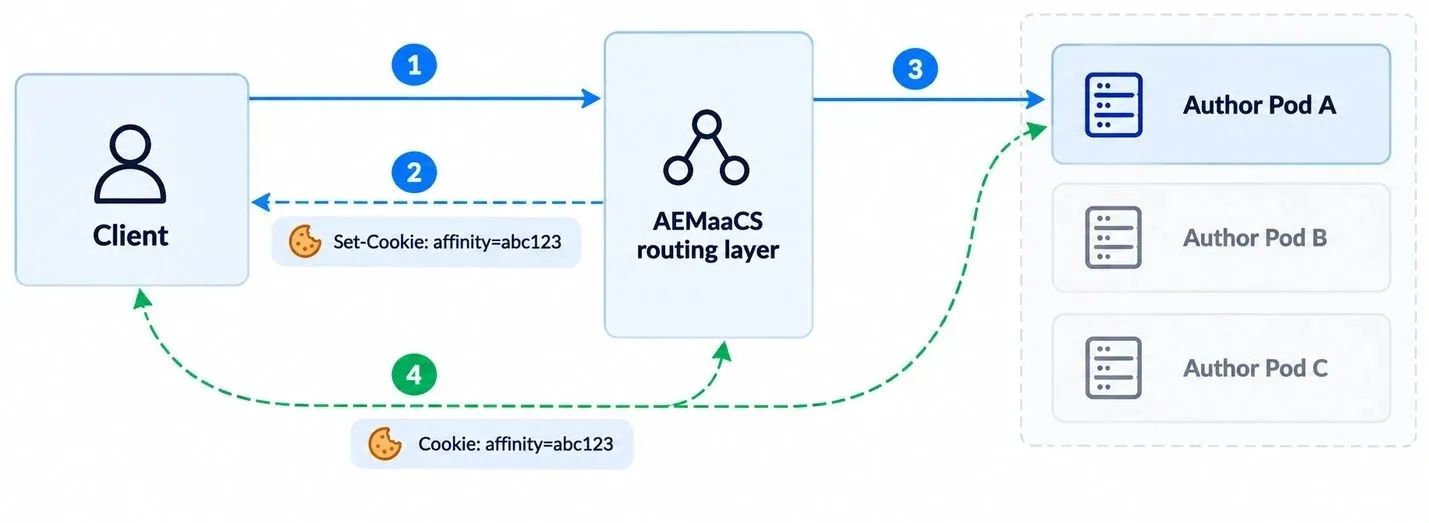
When a content author works in Universal Editor, the editing requests participate in the AEM routing mechanism. However, the Next.js application is a completely separate HTTP client. Its server-side requests originate from the infrastructure hosting Next.js, not directly from the author's browser. Even if the author's browser has an affinity cookie, that value is not automatically available to server-side requests made by Next.js. Consequently, Universal Editor can save content through Pod A while the Next.js application retrieves content through Pod B.
This is not necessarily a problem for normal content delivery, where requests are generally expected to retrieve content that is already available across the environment. However, during visual authoring, where editors expect to see their changes immediately after saving, even a short consistency delay can become a usability issue. The important realization was that both systems needed to participate in the same pod affinity mechanism, rather than independently requesting content from AEM Author.
Forwarding the AEM Affinity Cookie
One possible workaround would be to introduce a delay between saving content and refreshing the preview, allowing additional time for changes to become available across AEM Author pods. Another approach would be to retry the content request until the updated values become visible. While both approaches could reduce the frequency of stale previews, they would introduce unnecessary delays, additional requests, and more complexity into the authoring experience. They would also address the symptoms rather than the underlying routing issue.
Instead, we decided to propagate the AEM affinity cookie to our Next.js application, allowing its server-side requests to use the same affinity value as the editing session. The implementation is relatively simple. We include the affinity value as a query parameter in the URL used to load the Next.js application inside Universal Editor. Next.js then extracts this value and forwards it as a cookie when making API requests to AEM Author.
For example, the regular preview URL might look like this:
- nextjs.example.com/api/author
With the affinity value included, it becomes:
- nextjs.example.com/api/author?affinityCookie=<value>
This allows Next.js to use the same routing information when requesting content from AEM.
Adding the Affinity Cookie to the Universal Editor URL
The first challenge was making the AEM affinity cookie available to our Next.js application. We've implemented a custom Sling Servlet Filter that intercepts AEM's standard page-opening endpoint (/bin/wcmcommand). When the request contains cmd=open, the filter retrieves the affinity cookie, constructs the Universal Editor URL with the affinity value included, and redirects the author to Universal Editor with our Next.js application loaded in its canvas.
This allows us to preserve the affinity information from the original AEM request and make it available to the decoupled frontend when an author opens a page from the AEM Sites console. The following simplified example demonstrates the implementation:
@SlingServletFilter(
    scope = SlingServletFilterScope.REQUEST,
    methods = { HttpConstants.METHOD_GET },
    resource_pattern = "(^/bin/wcmcommand$)"
)
public class HeadlessPageRedirectFilter implements Filter {

    private static final String AFFINITY_COOKIE_NAME = "affinity";
    private static final String AFFINITY_COOKIE_PARAM = "affinityCookie";

    @Override
    public void doFilter(
            final ServletRequest request,
            final ServletResponse response,
            final FilterChain chain)
            throws IOException, ServletException {

        final SlingHttpServletRequest slingRequest =
            (SlingHttpServletRequest) request;

        if ("open".equals(slingRequest.getParameter("cmd"))) {
            final String pagePath = slingRequest.getParameter("path");

            if (StringUtils.isNotBlank(pagePath)) {
                final HttpServletResponse httpResponse =
                    (HttpServletResponse) response;

                httpResponse.sendRedirect(
                    buildRedirectUrl(pagePath, slingRequest));
                return;
            }
        }

        chain.doFilter(request, response);
    }

    private String buildRedirectUrl(
            final String pagePath,
            final SlingHttpServletRequest request) {

        final String affinityCookie = Optional
            .ofNullable(request.getCookie(AFFINITY_COOKIE_NAME))
            .map(Cookie::getValue)
            .filter(StringUtils::isNotBlank)
            .map(value -> URLEncoder.encode(
                value, StandardCharsets.UTF_8))
            .map(value -> "&" + AFFINITY_COOKIE_PARAM + "=" + value)
            .orElse(StringUtils.EMPTY);

        final String nextJsDomain = StringUtils.stripEnd(
            RegExUtils.removeFirst(nextJsUrl, "^https?://"), "/");

        return universalEditorUrl
            + nextJsDomain
            + "/api/author?path="
            + URLEncoder.encode(pagePath, StandardCharsets.UTF_8)
            + affinityCookie;
    }
}
For simplicity, this example omits the OSGi configuration and the additional validation we use to restrict the redirect to headless pages. In our implementation, regular AEM pages continue using the default page-opening behavior.
The resulting Universal Editor URL follows this structure:
https://universal-editor.example.com/canvas/nextjs.example.com/api/author?path=%2Fcontent%2Fexample%2Fen%2Fproducts&affinityCookie=<encoded-value>
The important detail is that the affinityCookie parameter becomes part of the Next.js authoring URL loaded inside Universal Editor. Next.js can then extract this value and forward it with subsequent requests to AEM Author, allowing those requests to use the same pod affinity as the original editing session.
Security and Operational Considerations
Although our implementation uses a query parameter to propagate the affinity value, this approach requires appropriate security controls. Query parameters can be recorded in application logs, monitoring systems, browser history, and HTTP referrer information. Therefore, the affinity value should only be propagated within a protected authoring environment, and the preview should never be exposed through shared caches. Where possible, a short-lived server-side token exchange is preferable to exposing the original cookie value in the URL.
It is also important to understand that pod affinity is a routing preference rather than a guarantee. AEMaaCS can replace pods, redistribute traffic, or invalidate affinity assignments as part of normal cloud operations. Applications should remain functional even when an affinity cookie is missing or no longer maps to the original pod.
Finally, this approach should be treated as a custom workaround rather than an officially supported Universal Editor capability. While AEM's affinity mechanism is part of Adobe's infrastructure, explicitly propagating that cookie to an external frontend is an architectural decision that should be validated for the specific environment.
Conclusion
Universal Editor makes it possible to combine AEM's visual authoring capabilities with modern, decoupled frontend architectures. However, moving rendering outside AEM introduces new dependencies between the editor, frontend application, content APIs, and underlying cloud infrastructure.
In our implementation, content changes were successfully saved in AEM but occasionally failed to appear in the Next.js preview. What initially looked like a frontend caching issue turned out to be a request-routing problem: Universal Editor and Next.js were reaching different AEM Author pods, and the updated content was not yet visible on the pod serving the preview request.
By propagating the AEM affinity cookie to Next.js and forwarding it with server-side API requests, we were able to significantly improve preview consistency during authoring without introducing artificial delays or repeated content requests.
The broader lesson is that decoupled AEM implementations require more than connecting a frontend framework to a content API. Rendering, caching, request routing, authentication, and content consistency all influence the reliability of the authoring experience.