Daniel Strmečki
AEM as a Cloud Service (AEMaaCS) shifts Adobe Experience Manager from a release-based model to a continuously delivered, cloud-native platform. Manual testing simply can't keep up with the pace of deployments, so test automation is now even more important to ensure quality, performance, and stability. Therefore, the move from on-prem AEM to AEMaaCS also demands a shift in testing strategy.
An important consideration is that Adobe-developed code is continuously updated and merged with customer code, which needs to keep up with it in every release. This shared responsibility model increases the risk of unintended side effects or regressions, making automated regression testing even more essential.
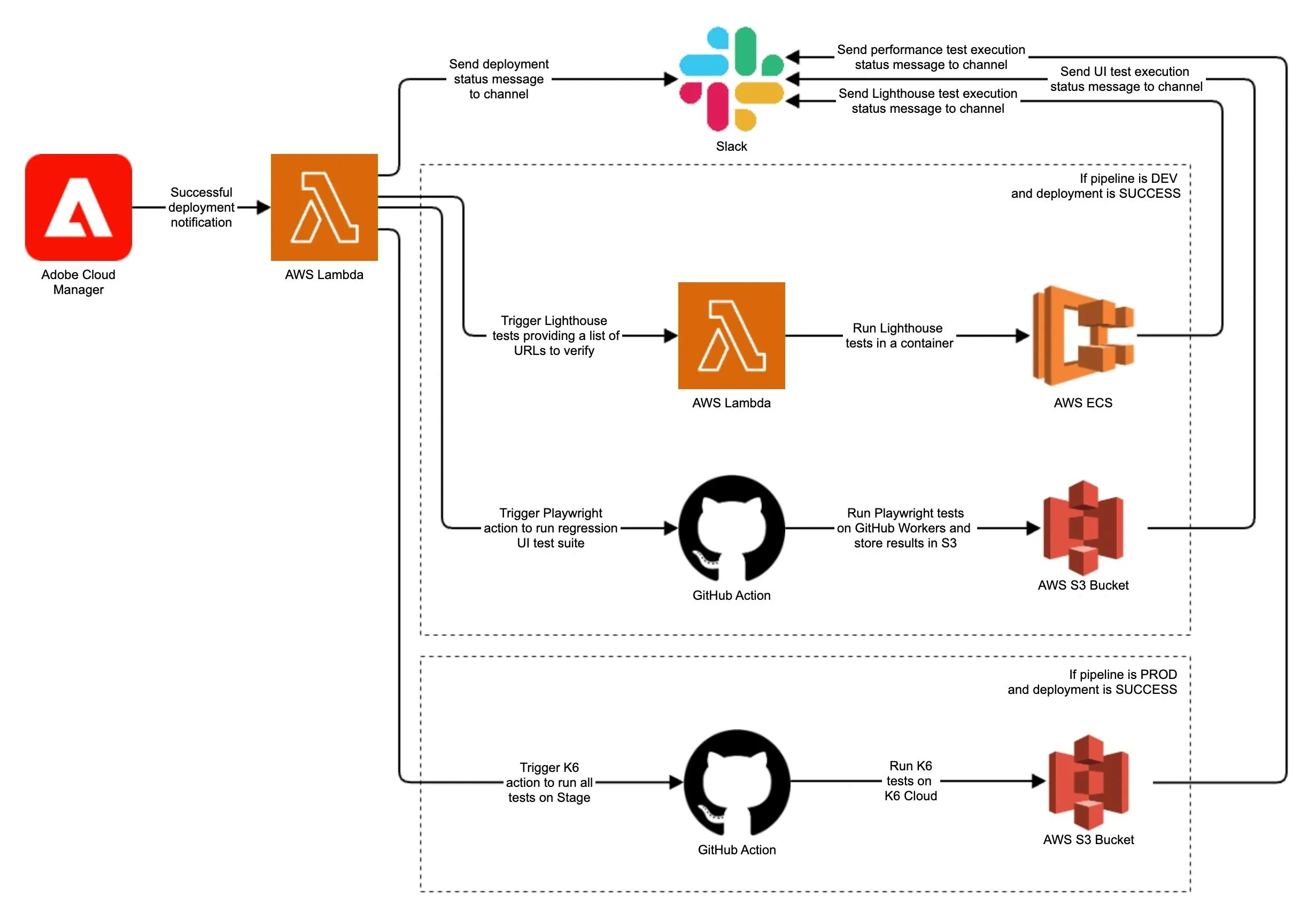
In this post, we'll explore different test types recommended for use on AEMaaCS projects. In part one, we'll examine unit, user interface (UI), and frontend vs backend performance testing. Then, in part two, we'll demonstrate how to automate test execution and reporting.
Unit Tests
Unit tests are developers' first line of defense in catching bugs early. In AEMaaCS, unit tests ensure that our business logic, Sling Models, OSGi services, and other backend integrations work as expected, before they are deployed anywhere. Unit tests need to be isolated, fast, and independent. Therefore, external dependencies are mocked using libraries like AEM Mocks and Mockito. The most common mistakes we see in AEM unit testing include:
- Tests that test the wrong thing; Focus on testing the business logic, at least the happy path!
- Mocking everything manually with Mockito; AEM Mocks is an amazing library, make sure to learn it and use it properly!
- Not separating the mock code from the test code; A lot of mocking can pollute the test class and make it very hard to understand and maintain!
- Not reusing the same mocks across tests; A lot of mocks in AEM can be reused across multiple tests, thus avoiding code duplication and easing maintenance!
- Not naming or describing test cases clearly; Invest time in properly naming tests, use given-when-then syntax combined with @DisplayName JUnit annotation!
Even though Adobe's SonarQube requires only 50% coverage, we recommend setting the threshold to 80% coverage from the start. The remaining 20% is usually fine because we don't need to test for every possible exception. However, coverage metrics can be easily fooled. Therefore, proper code review is essential for ensuring tests are maintainable and focus on testing the right thing. Well-written unit tests help prevent regression bugs during frequent deployments and make it easier for developers to refactor or extend logic with confidence.
UI Tests
UI tests focus on testing the end user interface, as well as authoring and publishing flow reliability. They go beyond testing business logic to ensure that AEM components render correctly and authoring options work as intended. UI testing is especially important in AEMaaCS, where unexpected changes can roll out automatically. Our recommendation is to design UI test cases as follows:
- Test each component in isolation; This approach makes it easy to spot where the error is if the test fails
- Prepare empty test component pages across all environments; Creating pages with each test takes significant time
- Add a component under test on the prepared page and edit the dialog options to fit a specific use case
- Verify the HTML output in the "View as published" mode; Publication and switching instances take significant time
- Delete the component once the test finishes; Cleanup is essential to ensure tests can run again
Catching visual regressions and usability issues is essential for any CMS. Automated UI tests can validate that editors still have access to enabled components, that dialogs open and save values correctly, that templates behave consistently across different environments, and that end users receive the expected output. Combined with a screenshot comparison tool, UI automation gives us confidence that both the end user and the authoring experience remain intact throughout updates.
Lighthouse Tests
Google Lighthouse/Pagespeed has become a de facto standard tool for guarding user experience and frontend performance. Lighthouse provides automated insights into Core Web Vitals and other key frontend performance metrics. As frontend performance, SEO, and accessibility are today non-negotiable for most enterprise brands, Lighthouse integration is a must-have on the AEMaaCS project. Our recommendation for integrating Lighthouse is as follows:
- Implement Lighthouse testing in AEMaaCS continuously from day one
- Prepare content pages to test each component in isolation, so we can easily spot issues after updates
- Prepare content pages to test realistic pages containing multiple components, ideally production content
- Run Lighthouse tests post-deployment on all AEMaaCS environments
- Enforce performance budgets and fail builds if a page score drops below the defined threshold
This way, we can ensure that performance expectations are continuously met from the beginning of the project, and never drop. Optimizing frontend performance at the end of a project can be very time-consuming and sometimes even impossible, depending on the implementation and technology choices made.
Performance Tests
While frontend performance impacts user experience, backend performance ensures our AEM instance can handle traffic spikes, concurrent user activity, and large data payloads. Load testing validates that our custom APIs and services perform well under stress. Our recommendation for integrating performance testing on AEMaaCS projects is as follows:
- Focus on testing customizations like APIs, pages, and components, not Adobe OOTB features
- Design load testing scenarios based on the current maximum traffic, then double it
- Prepare production-size content to run tests on
- Run performance tests on stage, as it is the only environment on AEMaaCS that scales like production
Performance testing should be considered a recurring activity, not a one-time check. Ideally, these tests should be automated and executed on stage, before any production deployment. Additionally, by incorporating backend performance tests into an observability pipeline (e.g., sending metrics to Datadog, Splunk, or New Relic), we can correlate slowdowns with code changes and react faster. Backend performance testing validates not just that the system works, but that it performs reliably, even under pressure.
Conclusion
The transition to AEMaaCS introduces both immense opportunities and unique challenges. With Adobe pushing out regular updates to the platform, customer code is constantly being merged with theirs. This shared delivery model means we can no longer rely on manual checks or periodic QA cycles to ensure quality. We need a solid, automated testing strategy baked into our development and deployment workflows.
In this post, we’ve walked through four essential types of testing that every AEMaaCS project should embrace:
- Unit tests catch bugs early and ensure backend logic is reliable
- UI tests safeguard both authoring and end-user experiences
- Lighthouse tests maintain frontend performance and SEO standards
- Performance tests validate that our backend can handle real-world loads
Each test type serves a specific purpose but collectively ensures our implementation is stable, fast, and future-proof. Test automation isn’t just a best practice; it’s a requirement for working effectively in an evolving ecosystem. Teams that automate early gain faster feedback, higher confidence in releases, and the ability to scale with the platform’s continuous delivery model. Therefore, stop treating testing as a one-time task. Instead, treat it as a continuous guardrail that enables you to innovate faster, without compromising on quality.
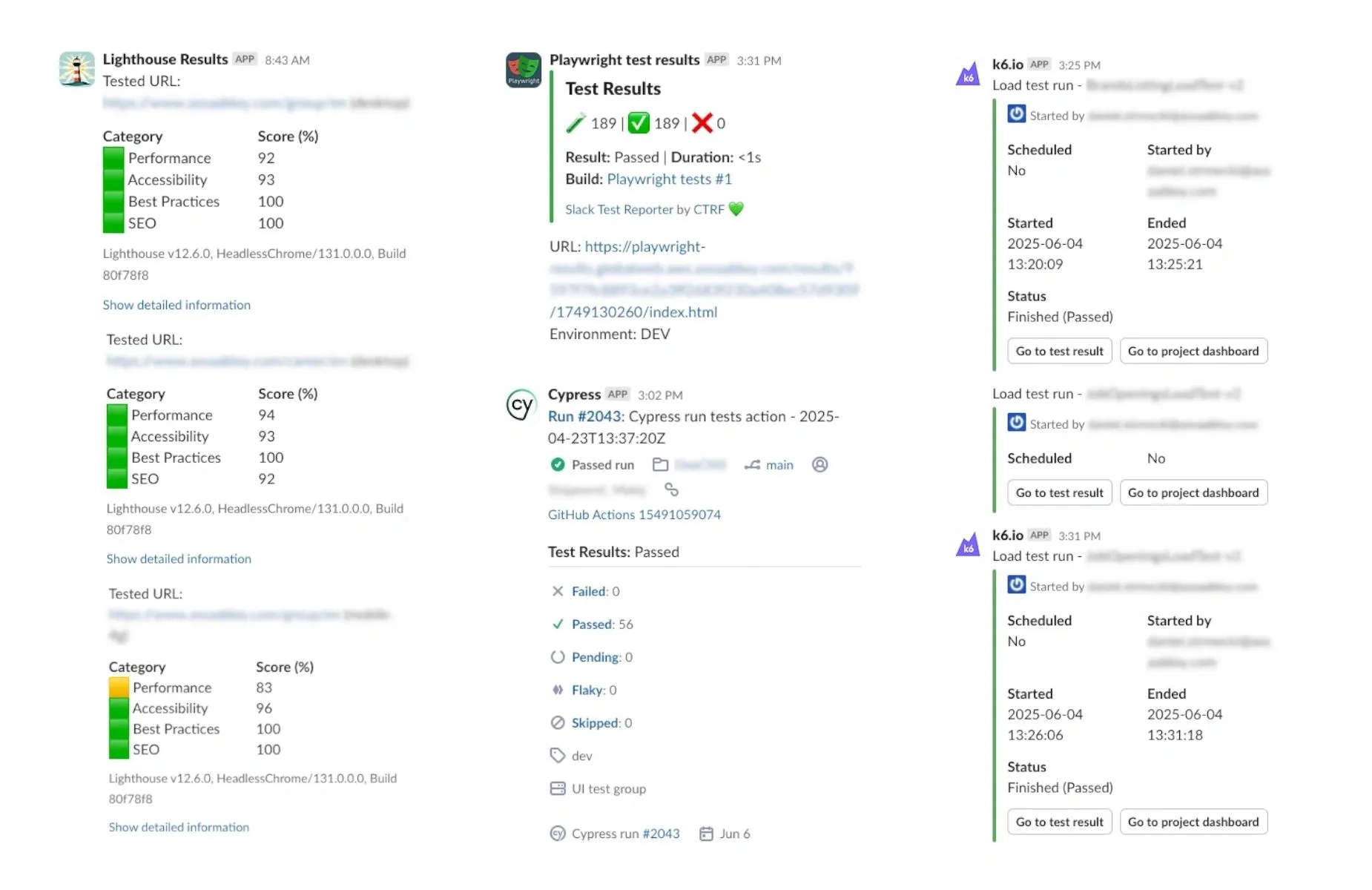
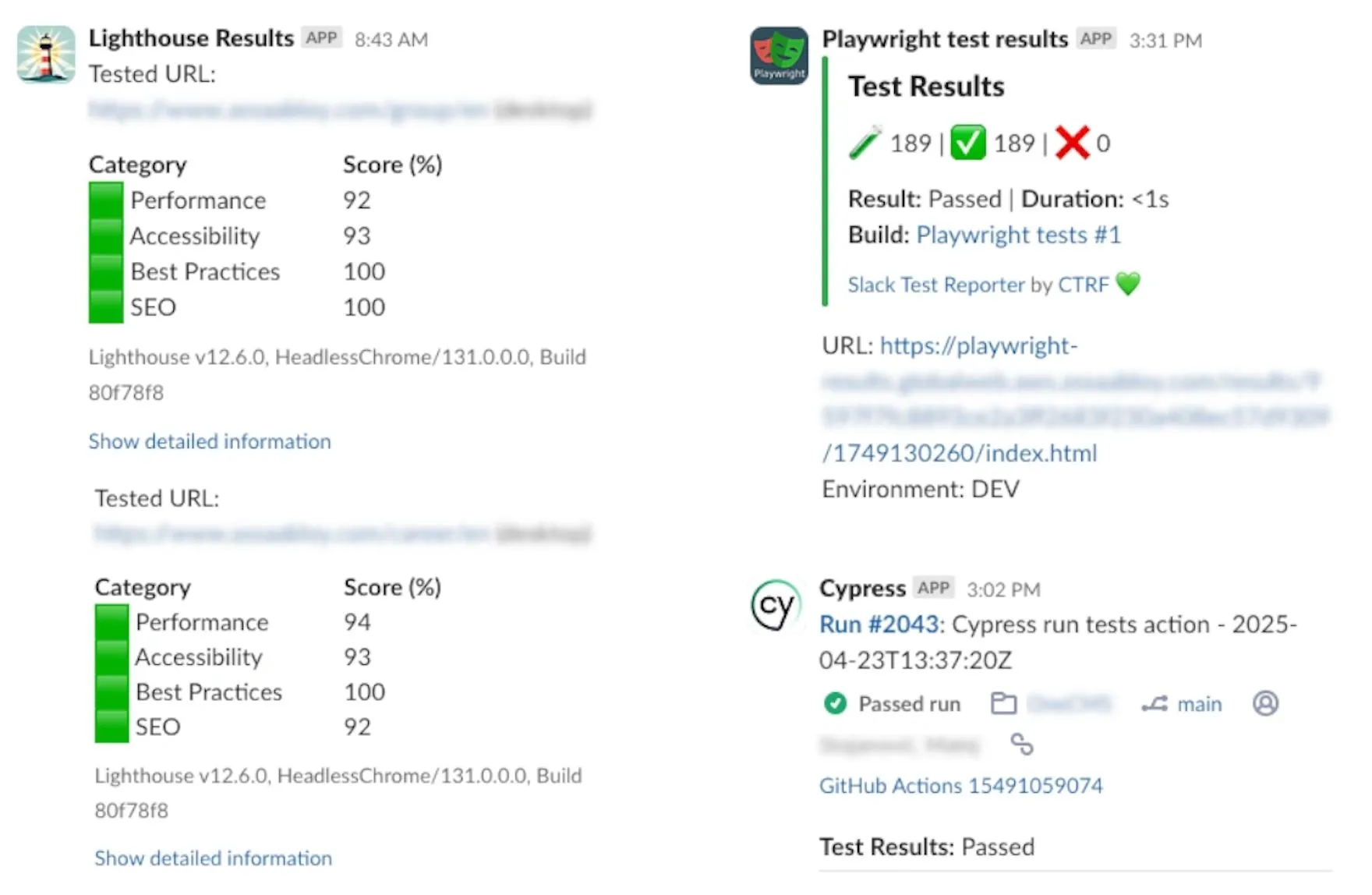
The screenshots above show example automated test results from one of our projects, posted regularly in Slack to inform the team about performance metrics after deployment. In the follow-up blog post, we'll demonstrate how to get this type of automation in place using Adobe Developer Console, Cloud Manager Events, GitHub Actions, and a few lightweight services running on AWS.
If your current AEM partner isn’t giving you this level of visibility and confidence, you might be flying blind. At Meticulous Digital, we specialize in building high-performance enterprise AEM solutions backed by a mature test automation strategy. Whether you’re just starting your journey with AEMaaCS or looking to level up your quality engineering processes, we’re here to help.