Daniel Strmečki
As an Adobe Experience Manager (AEM) developer, understanding HTTP cache headers is essential to optimize content delivery, enhance website performance, and ensure a seamless user experience. Cache headers play a critical role in controlling how content is stored and served by browsers, and intermediary caches like the AEM Apache/Dispatcher and CDN. Here are the most important cache headers every AEM developer should know how to use and apply.
Cache-Control
The Cache-Control response header defines caching policies for browsers and intermediary cache layers. The Cache-Control header allows developers to specify how and for how long a resource should be cached.
Example:
- Cache-Control: max-age=3600, public
Values explained:
- max-age: Sets the maximum time (in seconds) a resource is considered fresh.
- public: Indicates that the resource can be cached by any caching layer, including CDNs and browsers.
- private: Restricts caching to the user's browser only.
- no-cache: Forces revalidation before using cached content.
- no-store: Prevents the resource from being cached entirely.
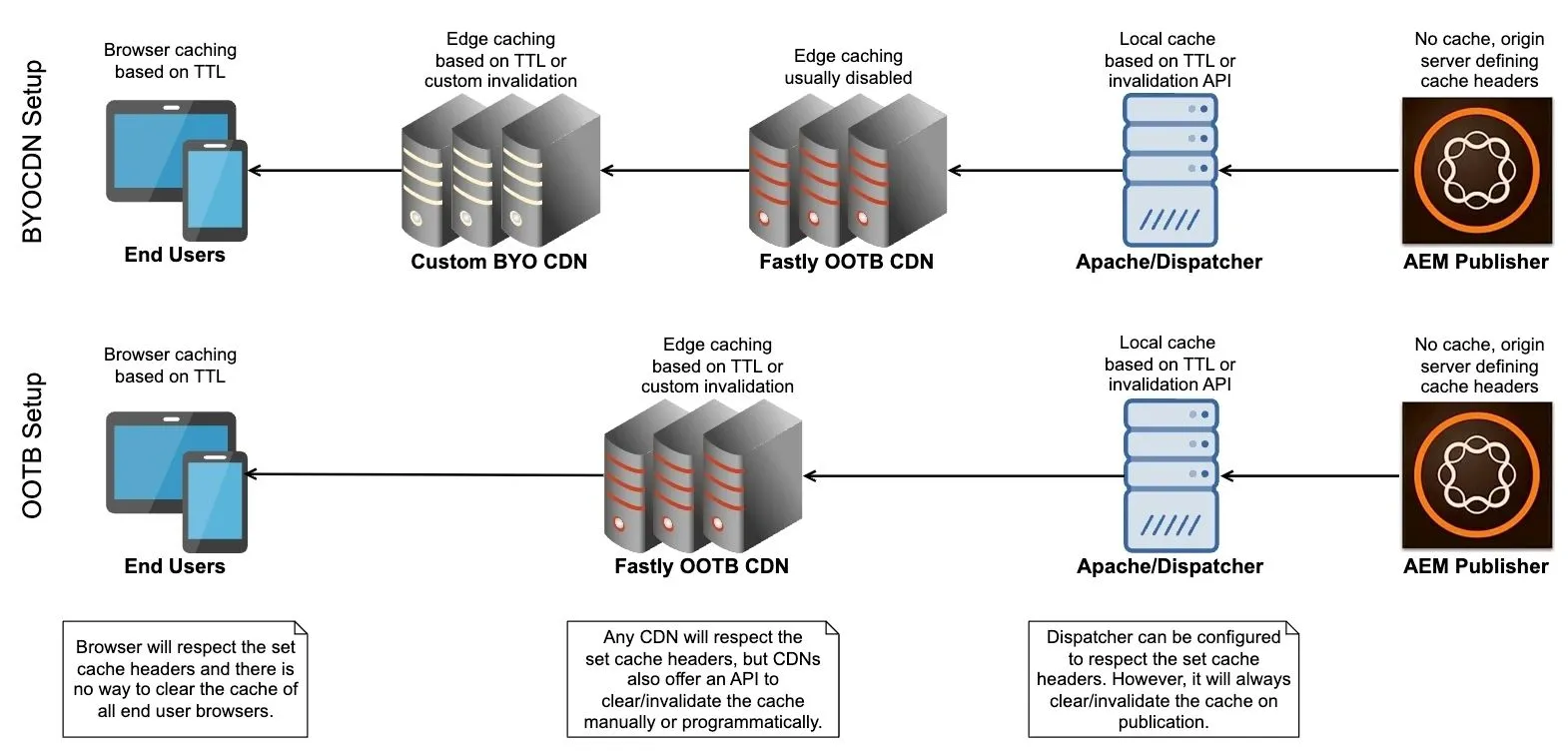
In AEM, we usually have two intermediary cache layers: Apache/Dispatcher and CDN. The Cache-Control header is often used to control the caching behavior for pages and assets. Static assets like CSS, JS, and images usually have a longer max-age, while frequently updated pages and APIs might use no-cache or a short max-age to ensure fresh content is served to end users.
Note that in case we set the Cache-Control header on the AEM Publisher, it will be applied to the Apache/Dispatcher, given that TTL is enabled in the Dispatcher configuration. However, if we set the Cache-Control header on the Apache/Dispatcher, then it will be applied to the CDN. CDNs usually forward the Cache-Control header to the browser, so the browser applies local caching as well.
Expires
The Expires response header specifies a date and time after which the resource should be considered stale. It serves a similar purpose to Cache-Control: max-age but uses an absolute timestamp.
Example:
- Expires: Wed, 15 Jan 2025 10:00:00 GMT
The Expires header is largely redundant nowadays when the Cache-Control header is available, as it provides a more flexible and robust way to manage caching behavior.
Age
The Age response header is not a directive but a response debug header. It indicates the time (in seconds) since the cached resource was fetched from the origin server.
Example:
- Age: 120
The Age header is particularly useful for debugging and monitoring cache performance. It helps developers identify how long a resource has been cached at a specific cache layer. In the Adobe-provided Fastly CDN, the Age header is not added OOTB, but a support ticket with Adobe can be raised to enable such debug headers. On Apache/Dispatcher the Age header is added OOTB to every response.
Since CDNs typically generate their own Age header, passing the Age header from the Apache/Dispatcher might cause some CDNs to calculate cache times incorrectly or duplicate the value. In such cases, we can unset it in the virtual host configuration file using the directive Header unset Age.
ETag
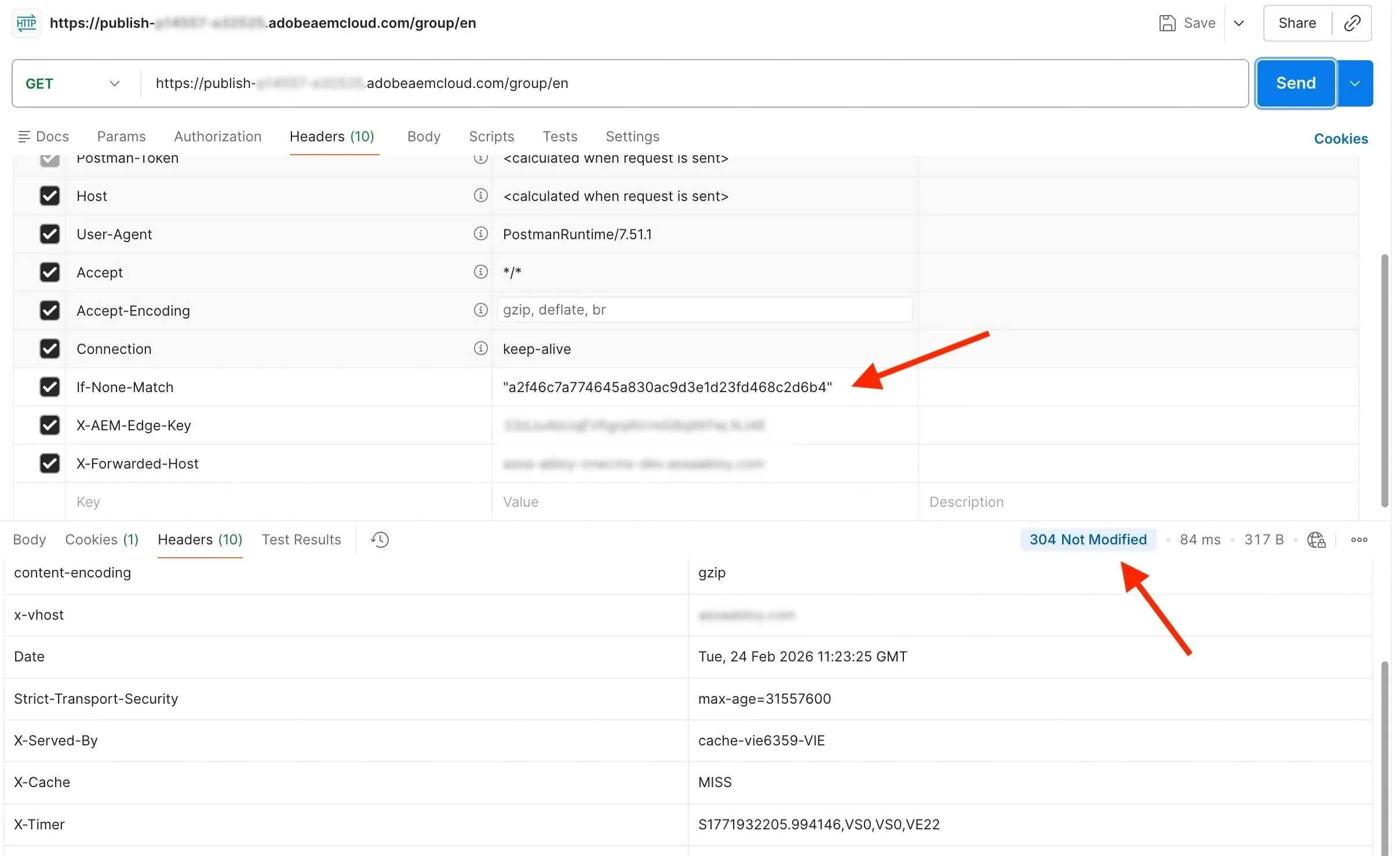
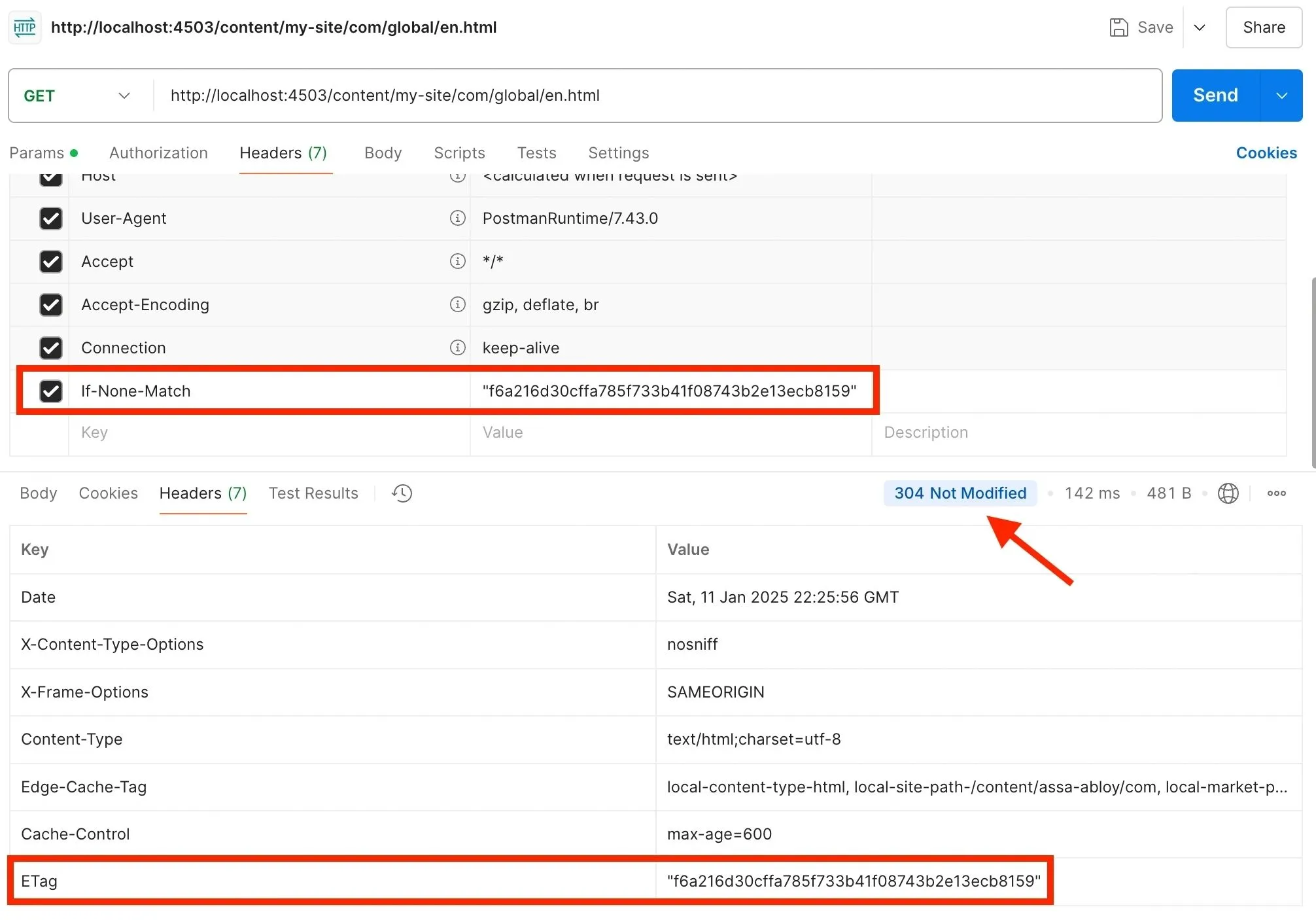
The ETag response header provides a unique identifier for a specific version of a resource. It helps caching layers to determine whether a cached version matches the current version on the server. Therefore it allows clients to send a conditional request using the If-None-Match request header, including the ETag value of its cached resource. The server compares the client's ETag value with the current ETag value of the resource. If they match, the server responds with 304 Not Modified and no body, saving bandwidth by not resending the resource again. If ETag values don’t match, the server responds with the usual 200 OK and sends the updated resource in the body. Therefore, the browser or CDN can quickly revalidate cached assets without downloading the entire resource.
Example:
- ETag: "my-unique-resource-tag-123"
In AEM, calculating unique ETag value is not supported OOTB, but a good solution is available from ACS Commons. Please note that Apache/Dispatcher will not respond with 304 Not Modified and no body in case GZIP compression is enabled by setting the SetOutputFilter DEFLATE configuration to the virtual host file. Even though this could be fixed by setting DeflateAlterETag NoChange, this directive is not currently enabled by the Adobe validator. Therefore, even though in this case Apache/Dispatcher will not respond with 304, it can still forward the correct ETag value from AEM to the CDN by:
- Setting the FileETag none configuration in the virtual host file to disable ETag generation by Apache.
- Adding the ETag header in the list of the supported headers to cache in /cache/headers section of the Dispatcher farm configuration.
Most modern CDNs, including Adobe-provided Fastly CDN, support 304 Not Modified responses for ETag headers OOTB. CDNs are designed to work seamlessly with ETag headers and conditional requests to optimize bandwidth and improve caching efficiency.
Vary
The Vary response header tells the cache layers which request headers should be considered when deciding whether to serve a cached response. It ensures the correct variant of a resource is served based on specific request attributes.
Example:
- Vary: Accept-Encoding, User-Agent
Vary is crucial when delivering personalized or compressed content from AEM. For instance, you may vary the cache based on User-Agent to serve different versions of a page for mobile and desktop users.
Surrogate-Control
The Surrogate-Control response header is similar to the Cache-Control but is intended only for intermediary caches, such as CDNs. It allows developers to set different caching rules for intermediary cache layers compared to the browser.
Example:
- Surrogate-Control: max-age=86400
Values explained:
- max-age=<seconds>: Sets cache lifetime at Fastly for the specified seconds.
- stale-while-revalidate=<seconds>: Serves stale content while fetching fresh content in the background.
- stale-if-error=<seconds>: Serves stale content if the origin is unreachable or errors.
- no-store: Prevents Fastly from caching the response.
- no-cache: Forces validation with the origin before serving cached content.
- private: Caches content only for the requesting user.
- public: Allows shared caching across users.
- must-revalidate: Requires revalidation with the origin once the cache expires.
- immutable: Marks the response as unchanging, enabling long-term caching.
In AEM setups, Surrogate-Control enables better control over the CDN cache layer. For instance, we might set a longer TTL for CDN caches while using a shorter TTL for browser caches via Cache-Control. Note that other CDNs may use custom headers and configurations for similar control, like the Edge-Control header.
A common use case for Surrogate-Control in the AEM BYO CDN model is to disable caching in the Adobe-provided Fastly CDN and use a custom CDN instead. We can achieve this by setting the following header value in the Apache/Dispatcher virtual host file.
Header set Surrogate-Control "private, max-age=0, stale-if-error=0, stale-while-revalidate=0"Surrogate-Key
The Surrogate-Key response header allows developers to tag cached content on the Adobe-provided OOTB Fastly CDN with specific cache keys. Note that we can assign multiple keys to a single resource, separated by spaces. We can use surrogate keys to tag related resources (e.g., assets, pages, or fragments) to simplify cache management. This enables us to group and invalidate/clear related cached objects efficiently. Note that other CDNs may use custom headers and configurations for similar control, like the Edge-Cache-Tag header.
Example:
- Surrogate-Key: blog-page article-123
Using Fastly's cache purge API, we can purge all cached objects with a specific surrogate key.
curl -X POST -H "Fastly-Key: {your_api_key}" -H "Accept: application/json" "https://api.fastly.com/service/{service_id}/purge/blog-page"In AEM setups, a good practice to follow is to set the Surrogate-Key header to the values that match the content types and their hierarchy. For example, we can tag all pages with HTML content type, site, market, and language they belong to. Such Surrogate-Key values would enable us to easily invalidate/clear the CDN cache for the complete site, market, or language. Here is an example of a well-defined Surrogate-Key header for an AEM page.
Surrogate-Key: prod-content-type-html prod-header-path-/content/my-site/com/group/en prod-footer-path-/content/my-site/com/group/en prod-site-path-/content/my-site/com prod-market-path-/content/my-site/com/group prod-language-path-/content/my-site/com/group/en prod-section-path-/content/my-site/com/group/en/solutions prod-division-path-/content/my-site/com/group/en/solutions/opening prod-page-path-/content/my-site/com/group/en/solutions/opening/door-1X-Cache
The X-Cache header is not a directive but a response debug header added by some cache layers OOTB, such as CDNs. This header indicates to developers whether a resource was served from the cache or fetched from the origin server. Note that X-Cache is widely supported by most CDNs, but some may use custom headers instead.
Example:
- X-Cache: HIT
Values explained:
- HIT: The resource was served from the CDN cache.
- MISS: The resource was fetched from the origin (AEM Publisher or Dispatcher).
- EXPIRED: The resource was cached, but it expired and was fetched again from the origin.
- BYPASS: The request bypassed the cache due to specific rules or conditions.
In AEMaaCS, the X-Cache header is set by the Adobe-provided OOTB Fastly CDN, not the Apache/Dispatcher. However, through customization, both AEM and Dispatcher might also insert or modify this header. This header is useful for debugging and diagnosing cache performance, allowing us to see whether a response came from the CDN cache or had to be retrieved from the Dispatcher.
X-Served-By
The X-Served-By header is another response debug header added by some cache layers OOTB, such as CDNs. It helps developers identify which server or cache node handled a particular request. It provides transparency into the request processing flow, allowing us to track where content is served from. Note that X-Served-By is not a standardized HTTP header, so some CDNs may use different headers like X-Cache-Remote.
Example:
- X-Served-By: cache-vie6342-VIE
In AEMaaCS, the X-Served-By header is set by the Adobe-provided OOTB Fastly CDN, not Apache/Dispatcher. However, through customization, both AEM and Dispatcher might also insert or modify this header.
Conclusion
Mastering cache headers is a key skill for AEM developers, enabling efficient content delivery and a better user experience. By using headers like Cache-Control, Surrogate-Control, and ETag, we can optimize caching strategies across the browser, Dispatcher, and CDN layers. Understanding and applying these headers will ensure your AEM implementation runs smoothly and performs at its best. It only takes a little bit of reading and trying out some requests to understand it properly.