Daniel Strmečki
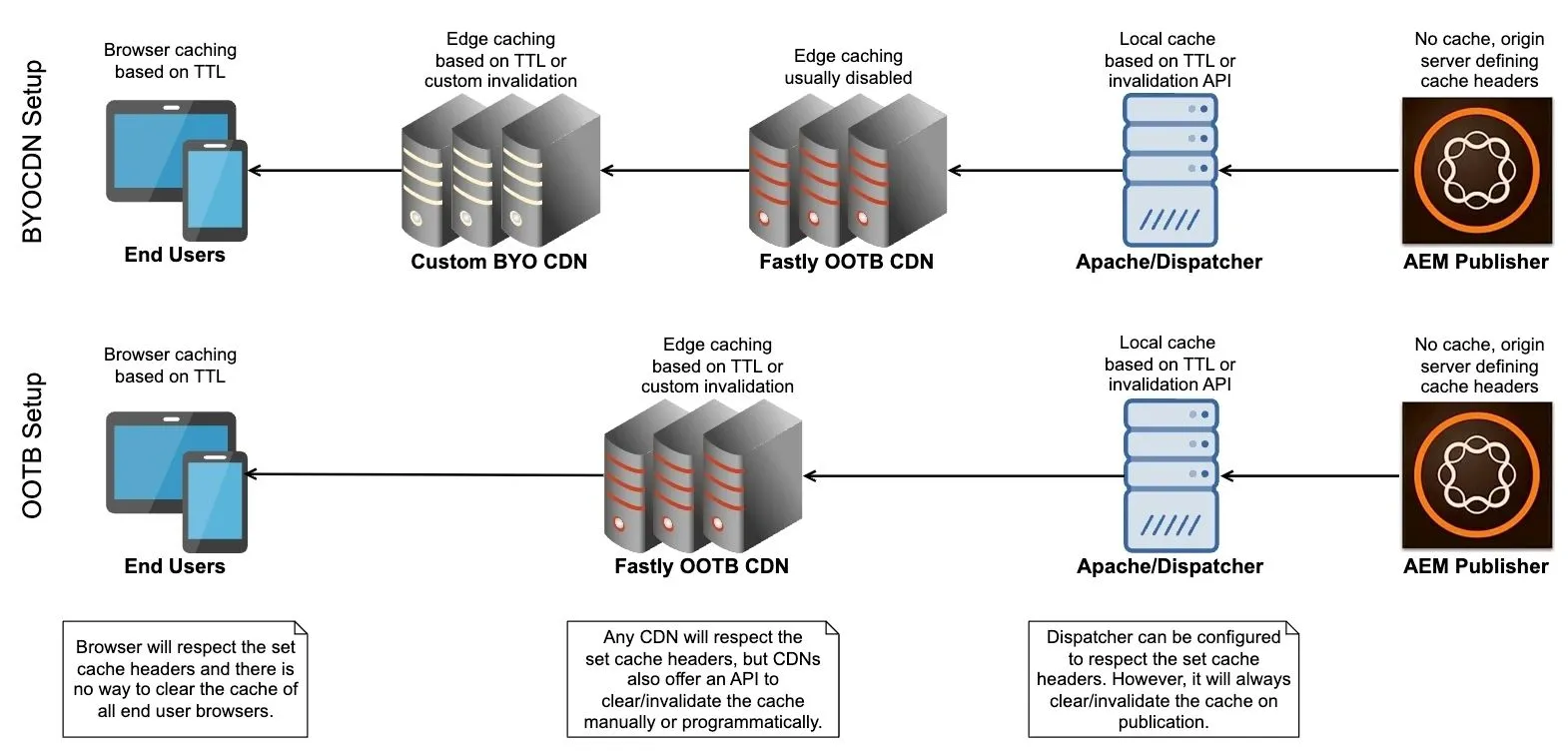
Caching is a critical component in the performance and scalability of web applications. For Adobe Experience Manager as a Cloud Service (AEMaaCS), understanding the nuances of caching mechanisms is essential to optimize system efficiency, author, and end-user experience. Two primary caching strategies to consider are Time-to-Live (TTL) and API-based Cache Invalidation. In AEMaaCS, caching occurs at multiple layers to ensure optimal performance and scalability. The Dispatcher acts as a caching and load-balancing mechanism. It caches responses from the AEM Publish instance, reducing load and response times. The CDN caches content closer to end users, leveraging a distributed network of servers to minimize latency. In some setups, organizations may choose to deploy their own CDN in front of the Adobe-provided Fastly CDN. This introduces a double-CDN architecture. In this article, we'll explain caching techniques used on all layers with and without a custom CDN and recommend best practices to follow.
AEM Publisher
AEM Publisher is not designed to function as a caching layer, as its primary role is to serve content as the origin server. However, development teams often implement in-memory caching strategies, such as caching objects, query results, or component outputs, to optimize performance for specific use cases. These approaches reduce computation overhead and improve response times. However, they need to be carefully managed to avoid memory overuse and ensure consistency during content updates.
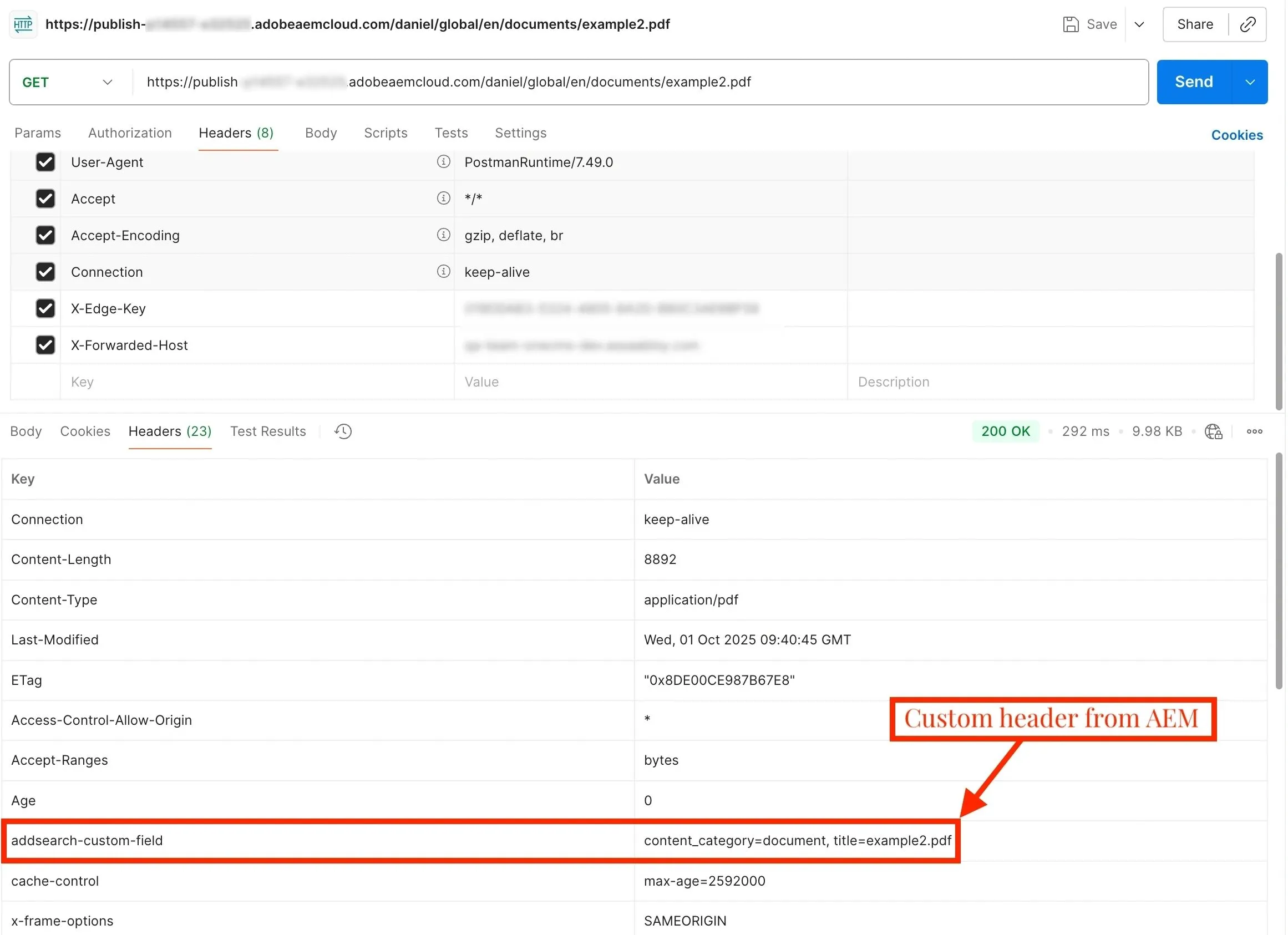
While AEM Publisher is not a caching layer, it plays a crucial role in controlling how content is cached in upper layers like Dispatcher, CDN, and web browsers. By setting appropriate TTL headers, such as Cache-Control, Expires, and ETag, AEM can define caching policies that determine how long content is stored and when it should be invalidated. These headers are passed from the AEM Publisher to the Dispatcher and usually also further propagated to the CDN and browsers, ensuring efficient caching and consistent content delivery across all layers. This allows developers to leverage AEM Publisher as a control point for optimizing caching strategies in the broader delivery architecture.
Apache/Dispatcher
Each AEM Publisher instance/pod in AEMaaCS is associated with its own Apache server with a Dispatcher module to manage traffic efficiently and ensure high availability. Dispatcher controls content caching, ensures content freshness through TTL or invalidation, and reduces the load on the AEM Publisher by handling requests locally, only forwarding non-cacheable requests.
The Dispatcher considers a content request non-cacheable and always forwards it to the AEM Publisher under specific conditions. This happens when the URL has no extension, includes query parameters, or is explicitly denied by the Dispatcher configuration (e.g., by path, pattern, or MIME type). Additionally, any response with a status code other than 200 or containing headers like Dispatcher: no-cache or Cache-Control: no-cache bypasses the cache. Similarly, POST requests are always forwarded to the Publisher as they are treated as non-cacheable by default.
The behavior of the Dispatcher cache depends heavily on whether TTL (Time-To-Live) is enabled or not and if the AEM Publisher is sending the TTL headers. We can enable TTL by setting the /enableTTL "1" in the Dispatcher farm configuration. When TTL is enabled, the Dispatcher sets a specific expiration time for cached content. As the TTL approaches, the content will expire from the cache and future requests will be forwarded to the AEM Publisher to fetch fresh content. Dispatcher ensures that content updates (author publications) in AEM are reflected sooner, without requiring manual invalidation or flushing of the cache.
When TTL is disabled, the Dispatcher caches content indefinitely or until the next cache flush request is triggered by author publications. This approach usually works together with the /statfileslevel "X" Dispatcher farm configuration, where X defines how many cache folder levels are considered independent. Any flush event (like page publication) under level X causes a cache invalidation of all the content on that level and below. For example, if we set the statfileslevel to zero, any flush request will invalidate the complete Dispatcher cache. Therefore, the usual recommendation is to set the statfileslevel to match the language page level in the AEM Sites hierarchy.
OOTB CDN
Like Dispatcher, the CDN caches content from AEM, such as images, HTML, CSS, JavaScript, API responses, and other resources. However, the CDN serves content to users from geographically distributed edge locations. This reduces latency, improves performance, and offloads traffic from the AEM Publisher. In AEMaaCS, the origin server from the CDN perspective is Apache/Dispatcher, not AEM Publisher.
The CDN cache is most often invalidated using TTL headers, such as Cache-Control, which defines how long the content should be cached before it expires. Therefore, content changes in AEM may take time to reflect in the CDN cache, depending on the TTL value set. This approach is straightforward to set up and maintain.
CDN vendors offer a cache purge API as an alternative, which allows for manual cache invalidation by immediately removing outdated cached content from the CDN cache. This method is useful for ensuring the latest content is served to end users without waiting for TTL expiration. Ideally, when content is modified in AEM, publication events would also trigger cache invalidation requests to the CDN. However, it is essential to ensure that the Dispatcher cache is invalidated before the CDN cache, to ensure content consistency.
Unfortunately, API-based cache invalidation does not work OOTB with CDNs, as with Dispatcher. Therefore, implementing it usually requires significant investments in terms of custom development, which can negatively affect maintainability on long-term, complex projects.
BYO CDN
A custom/BYO CDN allows for more granular control over caching policies, custom cache behavior, and performance optimization. It can also provide enhanced security features and offer better flexibility in managing cache invalidation, purging, and integrating with other tools or services, providing a more tailored solution to meet specific business requirements.
There is no significant difference in how the cache is invalidated in OOTB vs BYO CDN models. However, it is important to note that a custom CDN does not replace the OOTB CDN. Instead, it introduces a double-CDN architecture. In this setup, the custom CDN acts as the primary cache and edge layer, interacting directly with end users. The OOTB CDN can be used as a mid-tier cache, reducing the load on the AEM backend. In such setups, we need to ensure proper synchronization of caching rules between the two CDNs to prevent conflicts. Since having two CDNs is too complex to manage for many organizations, a more popular option is to completely disable caching in the OOTB CDN and use it only for origin protection and as a fallback CDN solution.
Browser Cache
Client browser caching works by storing static resources locally on a user's device so they don't have to re-download them for each visit. This improves page load times and reduces server load. However, unlike the Dispatcher or CDN cache, we cannot manually clear or invalidate the cache on client devices.
We can control how long the browser caches specific content by sending the appropriate TTL headers from the CDN to the browsers, such as Cache-Control. Therefore, on this cache layer, we can only rely on the TTL approach.
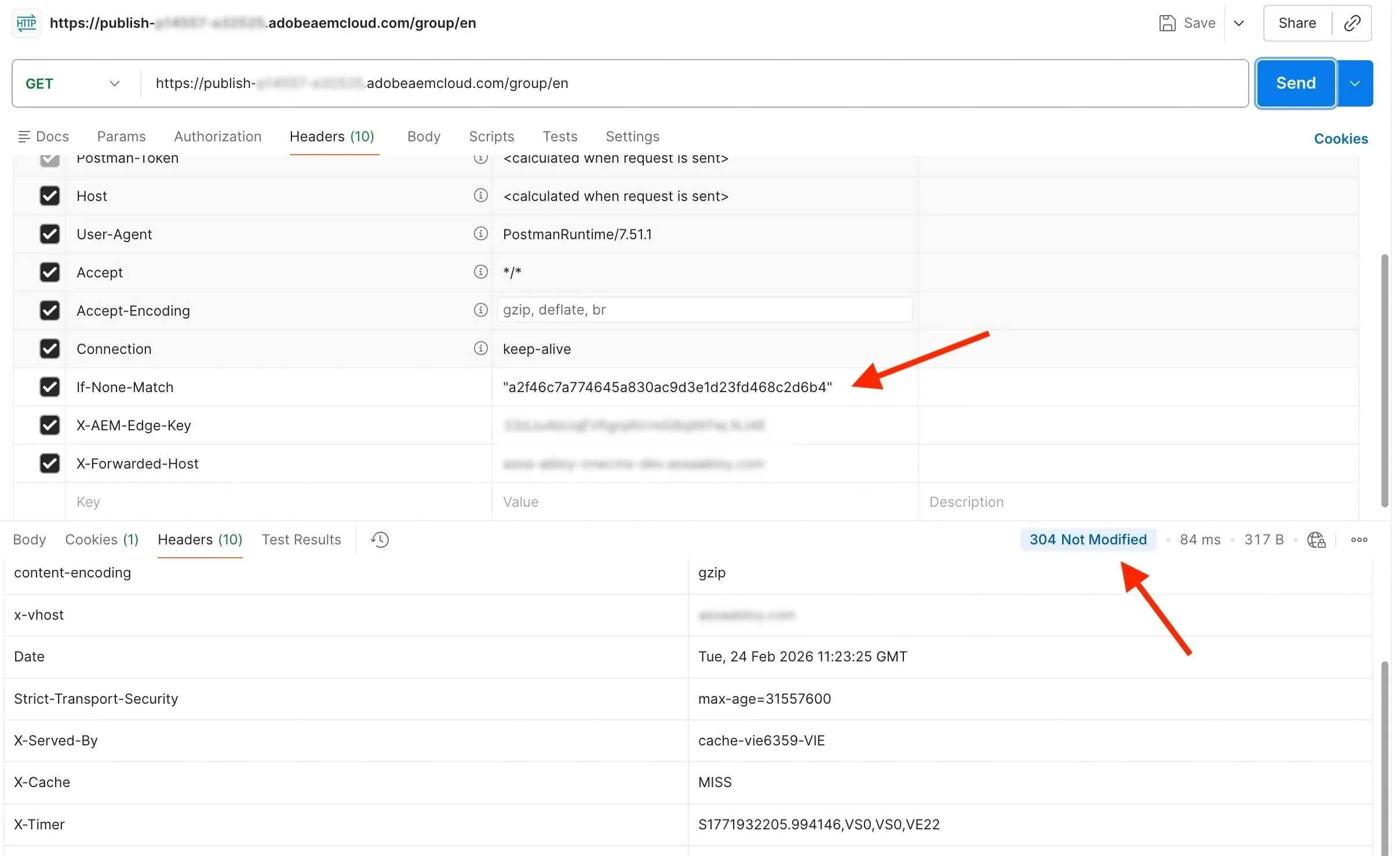
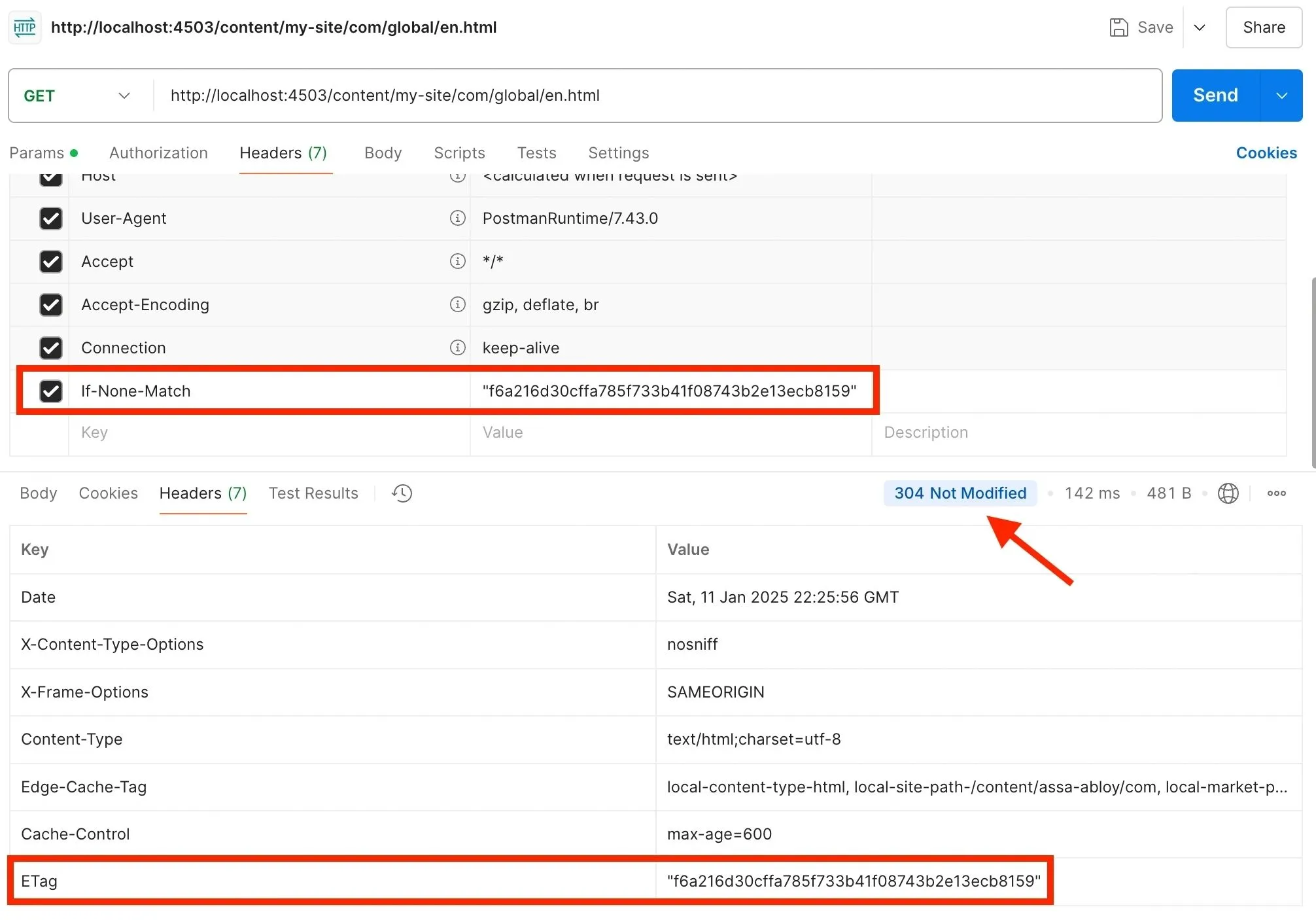
One optimization technique that works well with AEMaaCS is to reduce unnecessary downloads by only updating content when changes occur. ETag header is a unique identifier associated with a specific version of content, typically generated by the AEM Publisher server. When content gets updated, the AEM Publisher generates a unique ETag value. When a client sends an If-None-Match header with an ETag value, the CDN compares it with the current ETag, and if they match, a 304 Not Modified status is returned without the body. This means that the browser already has the latest version cached and we can optimize network traffic by not sending over the same content again.
Invalidate on Publication
Invalidating the cache on all layers when new content gets published is ideal when we want our end users to get fresh content as soon as possible. However, this technique only works OOTB with the Dispatcher cache layer. It requires custom implementation for the CDN cache, and it cannot be used for the browser cache. Here are a few more things to consider when deciding on the invalidate-on-publication approach:
- Content Volatility: Opt for cache invalidation when dealing with highly dynamic content like press releases or product prices.
- Automation: Integrate invalidation processes with content management workflows to ensure that updates trigger automatic cache purging.
- Precision Targeting: Leverage invalidation to update only the specific resources that change, avoiding unnecessary cache disruptions.
In my experience, developing a custom CDN invalidation logic for all content is most of the time not worth the required effort. Most editors and business owners are fine if their updated content gets served to end users a couple of minutes after publication. On the other hand, developing a custom invalidation logic for a few, specific pages that really need to be delivered to end users as soon as possible is a better approach. However, keep in mind that highly dynamic content should not be cached in HTML in the first place, and can instead be fetched using Ajax/XHR calls directly from the browser.
Rely on TTL
Relying fully on TTL is a viable option as it is supported on all layers: Dispatcher, CDN, and browser. Almost no custom development is required with this approach, besides setting the correct TTL headers, such as Cache-Control, on the AEM Publisher server. Here are a few more things to consider when deciding on the TTL-based approach:
- Content Stability: Use long TTL for content that remains static over time like images, style sheets, and JavaScript files. Use shorter TTLs for dynamic content like HTML pages or API responses.
- Traffic Patterns: Analyze traffic to identify high-frequency requests for static content that can benefit from long TTL values.
- Cost Management: Longer TTLs reduce the number of requests to the origin server, lowering operational costs and improving performance.
This approach simplifies cache management, as TTLs ensure content is automatically invalidated after some time. However, content changes may take time to propagate considering we have multiple cache layers. For example, if we set the TTL header on AEM Publisher for an HTML page to Cache-Control: max-age=300, we instruct the cache layers to cache the page for 5 minutes. However, since we have three different cache layers, it may take up to 15 minutes until all our end users receive the updated page content.
Mixed Approach
An effective caching strategy in AEMaaCS is a balance between TTL and custom invalidation. By understanding their pros and cons and tailoring the approach to business needs, we can achieve optimal performance, enhanced user experience, and efficient resource utilization.
Since automatic cache flush/invalidation is already implemented in Dispatcher, we should definitely use it. Enabling TTL on the Dispatcher level also makes sense as it gives us more control. Note that the Dispatcher will only apply TTL invalidation if it receives the TTL header from AEM Publish. Therefore, if we set our Cache-Control headers in the AEM Publisher, they will be honored by the Dispatcher. On the other hand, if we decide to set our Cache-Control headers in the Dispatcher, then they will be honored by the CDN and the browser.
Managing the CDN cache is much easier using TTL-based invalidation. Custom-developed cache invalidation via cache purge API can be applied where needed, for pages that require quick delivery of the updated content.
Recommendation
When starting a new AEMaaCS project we should set the TTL headers for the CDN on the Dispatcher level and rely on automatic cache flush/invalidation between AEM Publisher and Dispatcher. However, as projects get more complex, we may decide at a later point to set some or even all TTL headers on the AEM level. This can be helpful in projects with a lot of backend logic to automatically reference other content based on queries. As custom complex references are not recognized by the AEM's OOTB cache flush/invalidation process, this may confuse editors expecting their published content fragments to appear on all pages where they are used. Using TTL on the Dispatcher layer does not mean we will stop using the automatic cache flush/invalidation. It will still be applied to every content publication, but after some time, as defined in the Cache-Control header, the Dispatcher will re-fetch the content from the AEM Publisher. This approach may cause some unnecessary traffic between AEM Publisher and Dispatcher, but it can save us a lot of time on custom flush/invalidation logic development.
The choice between TTL and cache invalidation depends on your specific use case and content delivery requirements. Both approaches have their strengths and weaknesses, and selecting the right strategy often involves balancing multiple factors such as content type, update frequency, and user expectations. In case you are not sure which strategy to choose for your project, I recommend you start with the simplest approach: OOTB automatic Dispatcher cache invalidation and TTL-based approach for the CDN. Just make sure to think about cache invalidation in case you decide to introduce a custom content referencing logic.