Daniel Strmečki
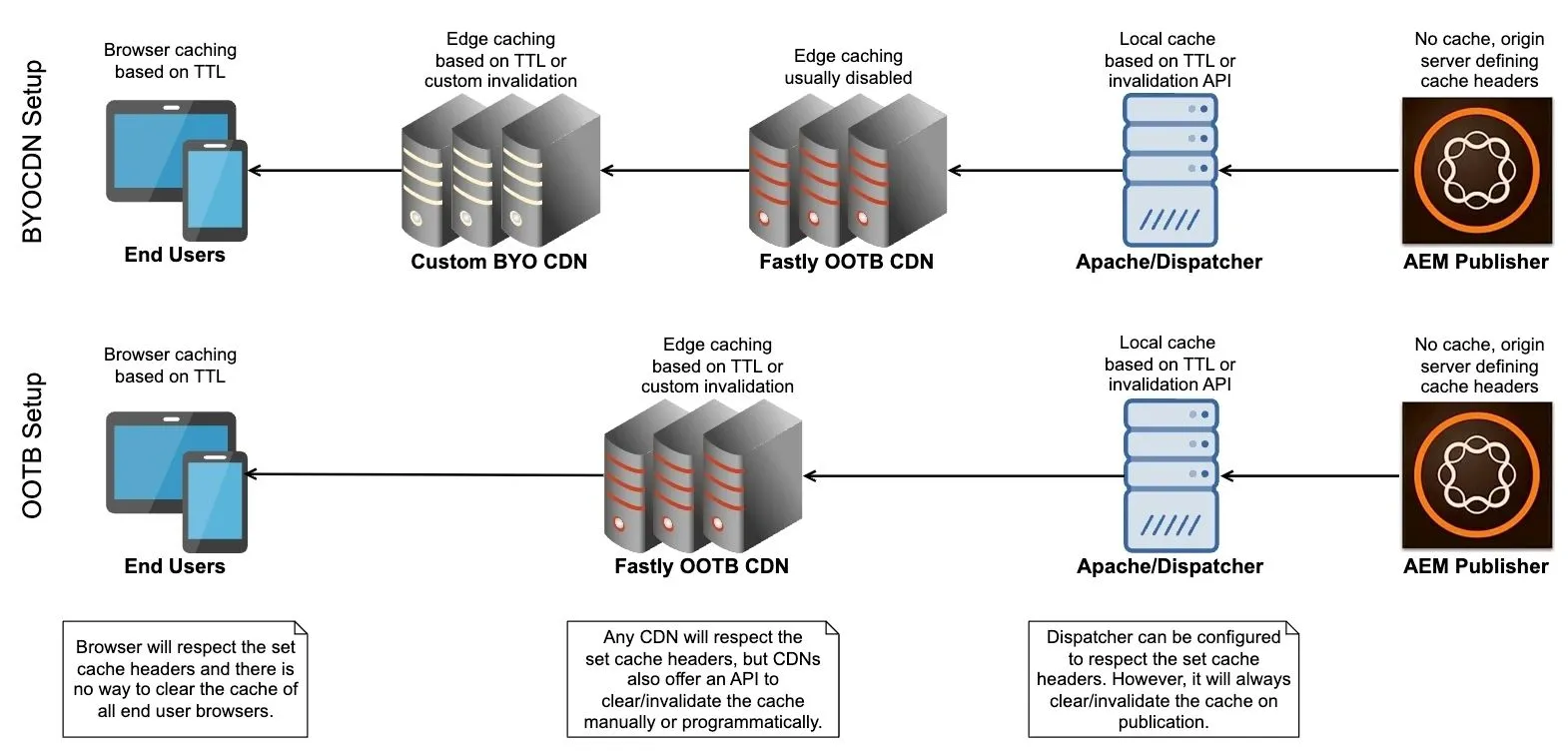
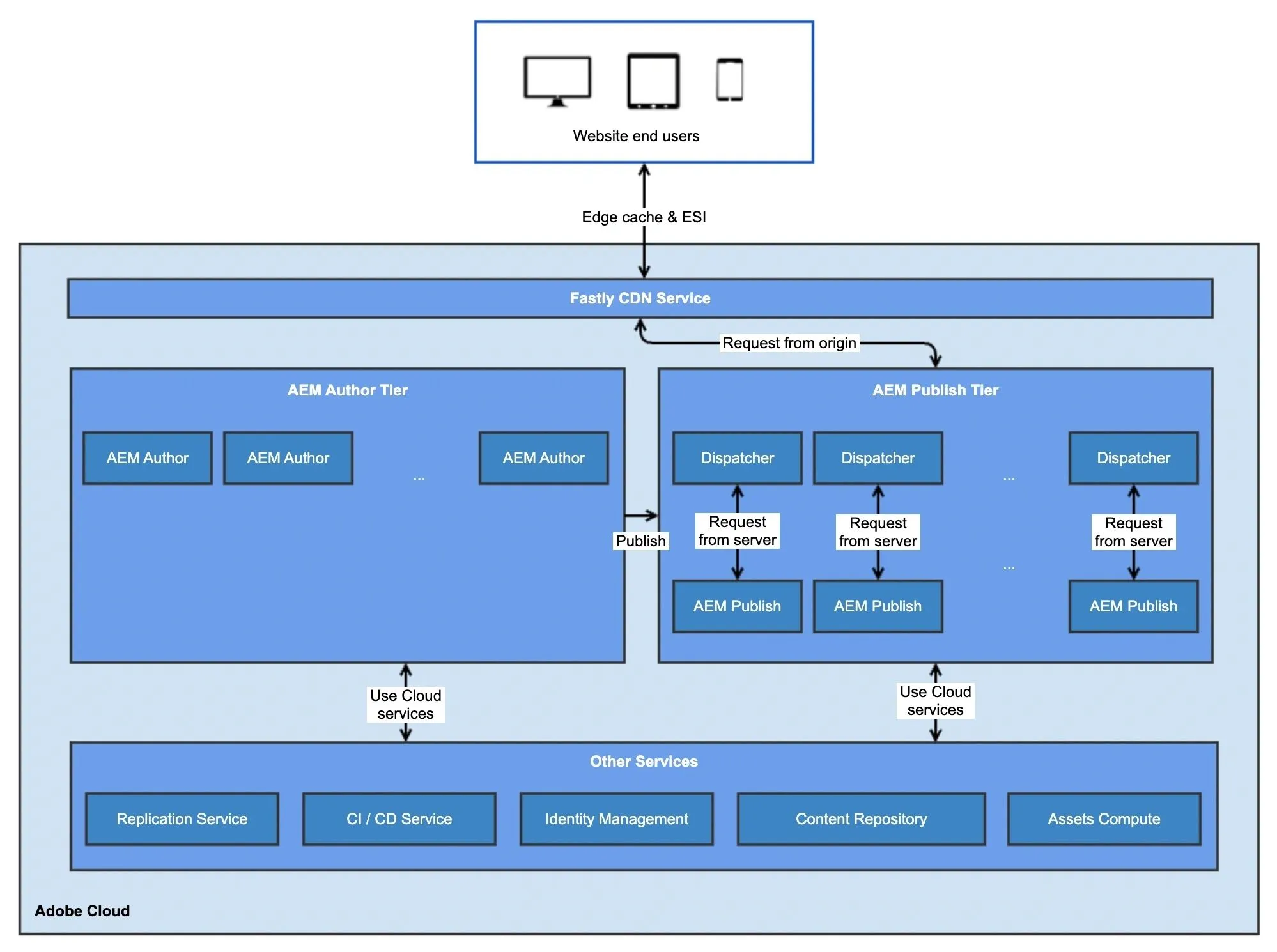
As I've been working with AEMaaCS since its early days, the OOTB Adobe-managed Fastly CDN option used to be very limited for customization. Therefore, we've seen many enterprise customers deciding on the bring-your-own CDN option to accommodate specific requirements. This option is still valid, but it means clients need to pay for two CDNs. Adobe-managed Fastly CDN comes OOTB with AEMaaCS and we cannot remove it from the architecture. We can only instruct it not to cache any content and pass it to the BYO CDN. However, Adobe has improved the OOTB CDN offering a lot since then. In this article, I will demonstrate what customization options are now available and where we still might find some gaps.
Certificate Management
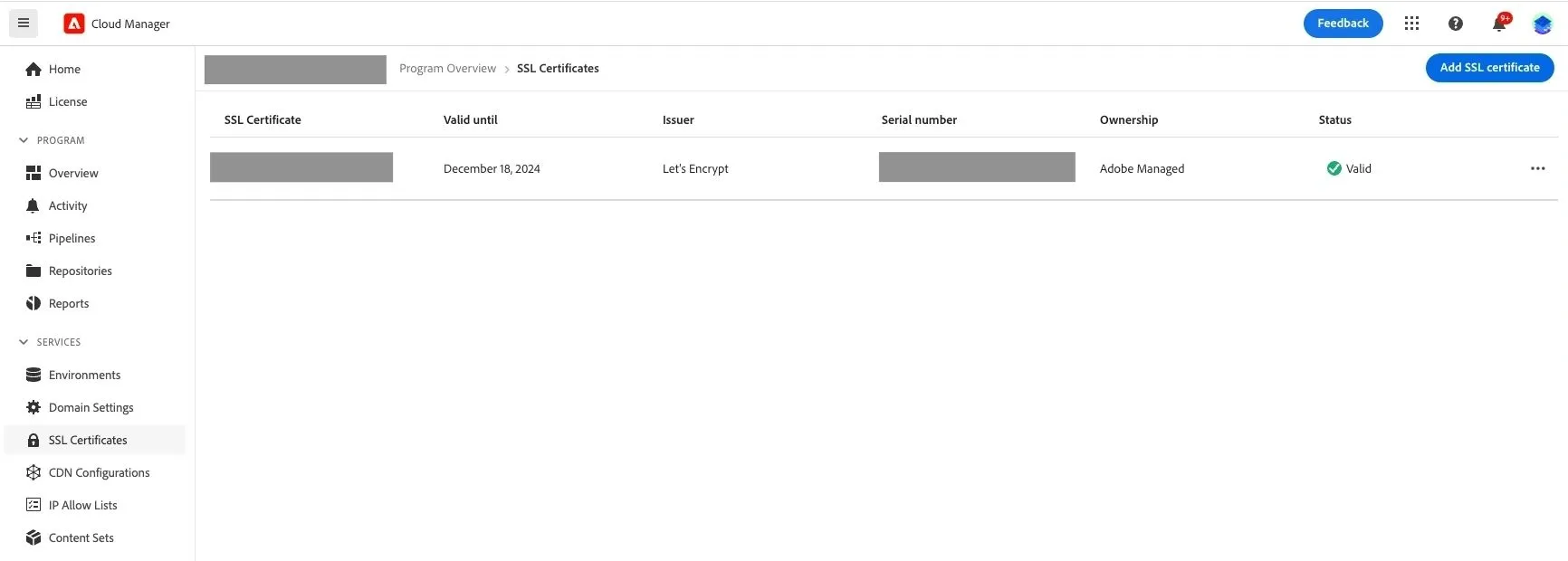
In the Adobe Cloud Manager, next to customer-managed certificates (OV/EV), support for Adobe-managed certificates (DV) has been recently added. DV (Domain Validated) SSL certificates are less secure but more affordable and quicker to obtain than OVs and EVs. They offer simple domain ownership validation without the need for extensive organizational verification. Adobe uses Let’s Encrypt to automate the certificate issuance process allowing websites to quickly and easily enable HTTPS without manual intervention.
There are only a few steps required to set up an Adobe-managed certificate (DV). First, we'll need to add our domain in the Cloud Manager → Domain Setting. To finalize this step, we need to add a specific CNAME record in the DNS service to verify the domain. Next, to add a DV SSL certificate, the only thing we need to do is to select our verified domain. We should note that after adding a new certificate, it will display as "invalid". However, after only a few minutes, the Let's Encrypt certificate validation should be finalized and the status should update to "valid".
CDN Config Pipeline
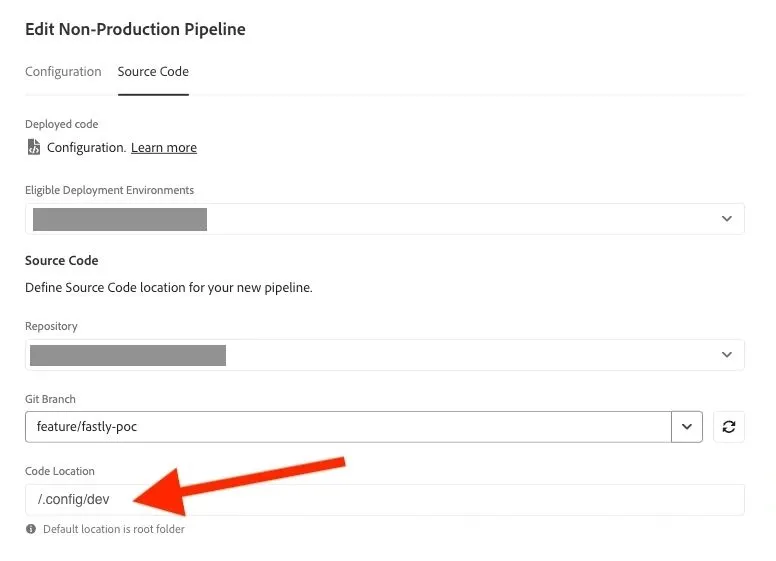
Adobe-managed CDN can be configured using a cdn.yaml file that needs to be pushed to the Adobe Git repo. To deploy that configuration to an AEMaaCS environment we'll need to create a config pipeline. For the pipeline source code, we should specify the branch and the path to the folder in which a cdn.yaml file is located. When running the config pipeline only the specified configurations get deployed. It takes only a few minutes depending on the amount of configurations.
In the following sections, we'll explore the configurations available for the Adobe-managed CDN. Those configurations should be placed in the cdn.yaml file under the data property:
kind: "CDN"
version: "1"
metadata:
  envTypes: ["dev"]
data:
  ...
Request/Response Transformations
AEMaaCS provides a range of features configurable at the Adobe-managed CDN, allowing for modifications to either incoming requests or outgoing responses.
Request transformation rules allow us to modify incoming requests. We can use them to set query parameters, request headers, and request cookies based on various matching conditions, including regular expressions. Here is one example rule that sets a custom variable for all requests:
requestTransformations:
  rules:
    # Set custom variable in the request, to be used later in the response
    - name: "set-custom-variable-rule"
      when:
        reqProperty: path
        like: "*"
      actions:
        - type: set
          var: my_test_var
          value: "on"
Response transformation rules allow us to modify CDN responses. We can use them to set response headers and response cookies based on various matching conditions, including regular expressions. Here is one example rule that sets a custom response header if a request variable value matches:
responseTransformations:
  rules:
    # Set custom response header based on the custom request variable
    - name: "set-response-header-while-variable"
      when:
        var: my_test_var
        equals: "on"
      actions:
        - type: set
          respHeader: x-cnd-config
          value: ".config/dev/cdn.yaml"
Traffic Rules
AEMaaCS OOTB will allow us to configure custom rate limits and traffic rules. Adobe recommends setting up the following starter rules for protecting against DDoS:
trafficFilters:
  rules:
    #  Block client for 5m when it exceeds an average of 100 req/sec to origin on a time window of 10sec
    - name: "limit-origin-requests-client-ip"
      when:
        reqProperty: tier
        equals: "publish"
      rateLimit:
        limit: 100
        window: 10
        count: fetches
        penalty: 300
        groupBy:
          - reqProperty: clientIp
      action: log
    #  Block client for 5m when it exceeds an average of 500 req/sec to CDN on a time window of 10sec
    - name: "limit-requests-client-ip"
      when:
        reqProperty: tier
        equals: "publish"
      rateLimit:
        limit: 500
        window: 10
        count: all
        penalty: 300
        groupBy:
          - reqProperty: clientIp
      action: log
Also, we may add additional custom rules to block specific IPs, countries, paths or query parameters. Here is one example of how to block traffic towards a specific path:
trafficFilters:
  rules:
    #  Block requests to path 'global/en/legal'
    - name: "block-request-to-specific-path"
      when:
        allOf:
          - reqProperty: tier
            equals: "publish"
          - reqProperty: path
            equals: "/global/en/legal"
      action:
        type: block
Web Application Firewall
More advanced OOTB rules known as WAF traffic filter rules require an Enhanced Security license or a WAF-DDoS Protection license. If WAF is licensed, Adobe automatically applies blocking rules to protect against many known common vulnerabilities and exposures. Also, vulnerabilities may be added soon after being discovered and customers do not need to configure them.
Without WAF licensing, we would need to set up rules for protecting against common vulnerabilities and exposures ourselves. Here is one example of how we can create a custom rule for protecting against cross-site scripting (XSS):
trafficFilters:
  rules:
    #  Block XSS attacks in query params
    - name: "block-request-containing-xss-scripts-in-query"
      when:
        allOf:
          - reqProperty: tier
            equals: "publish"
          - reqProperty: queryString
            matches: "(<|%3C)(.*?)(>|%3E)"
      action:
        type: block
    #  Block XSS attacks in X-Forwarded-For header
    - name: "block-request-containing-xss-scripts-in-header"
      when:
        allOf:
          - reqProperty: tier
            equals: "publish"
          - reqHeader: X-Forwarded-For
            matches: "(<|%3C)(.*?)(>|%3E)"
      action:
        type: block
Note that creating those rules also means maintaining them regularly, which is usually not recommended unless we have a dedicated and experienced internal security team.
Edge Redirects
Although not yet generally available, edge redirects can be used through the Adobe early-adopter program. When a rule matches, the CDN responds with a status line containing the status code and message (e.g., HTTP 301 Moved Permanently) and sets the location header accordingly. Here is an example of how to test absolute and relative redirects:
experimental_redirects:
  rules:
    - name: "redirect-absolute"
      when:
        reqProperty: path
        equals: "/my-page-one"
      action:
        type: redirect
        status: 301
        location: https://example.com/example
    - name: "redirect-relative"
      when:
        reqProperty: path
        equals: "/my-page-two"
      action:
        type: redirect
        location: /another-page-two
Edge-Side Includes
Edge Side Includes (ESI) is a markup language that allows dynamic content to be assembled at the edge, or CDN layer, by including smaller, cacheable fragments within a larger web page. To enable ESI processing on Adobe-managed CDN we need to disable GZIP compression on Apache and set two custom headers to instruct Fastly to enable ESI and compression. Therefore, we should add the following configuration to our Dispatcher VHOST file:
# Enable ESI on Fastly
<LocationMatch "/*.html">
# Disable dispatcher compression
SetEnv no-gzip 1
# Enable esi processing
Header set x-aem-esi "on"
# Enable edge compression
Header set x-aem-compress "on"
</LocationMatch>
Although not required, Sling Dynamic Include (SDI) can be used to generate the ESI snippets that are interpreted at the CDN level. An example ESI directive in the HTML output of our AEM Publisher should look something like this:
<esi:include src="https://www.example.com/global/en/header/_jcr_content/root/header.esi-component.html"/>Geo-Targeting
Since many enterprise websites use geo-targeting to redirect users to the appropriate country and language, I've decided it's worth a dedicated section. One way to achieve this would be using edge redirects. However, many clients prefer to have a frontend solution like a popup that offers users the recommended country redirect option. To achieve this in the frontend code, we need to set a response header or a cookie containing the client country code:
requestTransformations:
  rules:
    # Set gw_geo_cc in the response to be used by FE for geo-redirects
    - name: "set-geo-location-response-cookie"
      when:
        reqProperty: path
        like: "*"
      actions:
        - type: set
          respCookie: client-country
          value: { reqProperty: clientCountry }
Cache Purging
CDN cache purging is the process of removing outdated or invalid content from a CDN's cache, ensuring that users receive the most up-to-date version. To enable CDN cache purging we first need to set purge keys in the cdn.yaml configuration. Note that the variables used in the example are Cloud Manager secret environment variables:
authentication:
  authenticators:
    - name: purge-auth
      type: purge
      purgeKey1: ${{CDN_DEV_PURGEKEY_1}}
      purgeKey2: ${{CDN_DEV_PURGEKEY_2}}
We can now use one of the purge keys configured to send CDN invalidation requests to Fastly:
curl -I -X PURGE "https://example.com/global/en" \
-H 'X-AEM-Purge-Key: <REPLACE_WITH_SECRET_KEY>'
304s with ETags
The ETag header is used to validate cached content by providing a unique identifier for a resource, allowing browsers or CDNs to determine if the resource has changed and whether to serve a fresh or cached version. ETags are useful because they enable efficient caching by allowing servers and clients to quickly check if a resource has changed, reducing unnecessary data transfers and improving website performance.
For ETags to work on the edge, they first need to be properly generated on AEM Publisher. ACS Commons ETag support offers a good solution for achieving this. Fastly supports ETags OOTB, there is no additional configuration required. To test this functionality we just need to send a request containing the "If-None-Match" header. In case the "If-None-Match" header value is the same as the cached "etag" header value, Fastly will respond with 304 and no content in the body.
curl -I -H "If-None-Match: \"540274087fb6cda23d0c9c9beb1d6c98a40d147\"" \
  https://example.com/global/en
  HTTP/2 304
Gaps and Limitations
The biggest gap I've found in the current version of the OOTB Adobe-managed Fastly CDN is no support for edge workers or edge computing. Edge workers enable serverless computing at the edge of a CDN, allowing developers to run custom code closer to users for faster response times, reduced latency, and improved scalability while enhancing the ability to personalize content and handle complex tasks without needing to route traffic back to a central server.
Additional limitations we should be aware of are:
- Cloud Manager allows a maximum of 50 installed SSL certificates
- The size of the CDN configuration file cannot exceed 100 KB
These should be fine for most websites. However, it is worth checking them in cases when we have many websites on one AEMaaCS platform or if we plan to have a lot of custom CDN configurations.
Conclusion
Nowadays, I believe that the OOTB CDN that comes with AEMaaCS is good enough for most client needs. Maybe it's time for your client to stop paying for two CDNs. However, the decision between the OOTB CDN and the bring-your-own CDN option should be based on analyzing specific client requirements and budget implications. Therefore, I cannot give you a concrete answer, but I hope this article helps you understand what is supported and possible.