Migrating Sites to Classic (Non-EDS) AEM with AI: Adobe Experience Modernization
 Daniel Strmečki
Migrating existing websites to Adobe Experience Manager (AEM) is often a time-consuming and repetitive process. Even when an organization already has a well-established AEM platform with reusable templates and components, onboarding a new website requires significant manual effort, from analyzing the existing site structure and migrating assets to rebuilding pages using the available components.
With the introduction of Adobe's Experience Modernization Agent, many of these activities can now be performed with the help of AI. However, the tool was built primarily for Edge Delivery Services (EDS), where website modernization often involves recreating existing experiences and developing new blocks. This is somewhat different from what we typically want to achieve when migrating websites to an established classic AEM platform, where the objective is to map existing content to an already available set of templates and components.
This raises an interesting question: can organizations that are not using Edge Delivery Services still leverage Adobe's Experience Modernization Agent to simplify their website migrations? We recently decided to explore this possibility, and the results were surprisingly promising.
The Challenge of Onboarding New Websites
In large enterprise AEM implementations, onboarding new websites is rarely a one-time activity. Organizations acquire new companies, introduce new brands, consolidate existing digital platforms, and continuously migrate websites into their central CMS. One of the main objectives of establishing a centralized AEM platform is precisely to simplify this process by providing reusable templates, components, integrations, and a consistent content governance model.
When migrating a website to such a platform, the objective is typically not to reproduce the original website exactly as it was, but to preserve its content while leveraging the capabilities of the existing AEM implementation. The migration process typically involves:
- Analyzing the existing website and its page hierarchy
- Creating the corresponding site structure in AEM
- Extracting and migrating digital assets
- Mapping pages and content to existing AEM templates and components
- Updating internal links and asset references
- Reviewing and adjusting the migrated content
While some of these activities can be automated using traditional migration scripts, content mapping has always been more challenging, particularly when source websites use different technologies, content structures, and design patterns. This is where AI can provide significant value. Rather than implementing complex mapping rules for every source website, we can leverage AI to understand the content and determine how it should be represented within the target AEM platform.
Providing the AI Agent with Platform Context
One of the prerequisites for using AI effectively in this scenario is providing it with sufficient context about the target AEM implementation. An AI agent might understand that a particular section of a website represents a hero banner or a collection of cards, but it cannot know how these elements should be represented in a specific AEM implementation without understanding its component definitions, supported properties, nesting structures, and template configurations.
For our experiment, we prepared four JSON files describing our existing AEM platform:
| File | Purpose |
|---|---|
components.json | Available components, their properties, resource types, and content structures |
descriptions.json | Descriptions explaining the purpose and intended usage of components |
templates.json | Available AEM page templates and their definitions |
structure.json | Conventions for organizing pages, assets, and other content |
Preparing these files required very little manual effort. Instead of documenting the existing AEM implementation ourselves, we leveraged GitHub Copilot to analyze our AEM code repository and generate the corresponding JSON definitions. Since most of the information was already available within the codebase, including component dialogs and template configurations, generating a machine-readable representation of our platform took only a few minutes.
Having such a representation is valuable beyond website migrations, as it provides a foundation for other AI-assisted content operations within an existing AEM platform.
Migrating a Website Using Adobe's Modernization Agent
For the experiment, we used our own website, which is not built on AEM, as the migration source. The underlying technology of the source website is largely irrelevant, as the agent analyzes the website as it is exposed to visitors without requiring access to its original CMS or code repository.
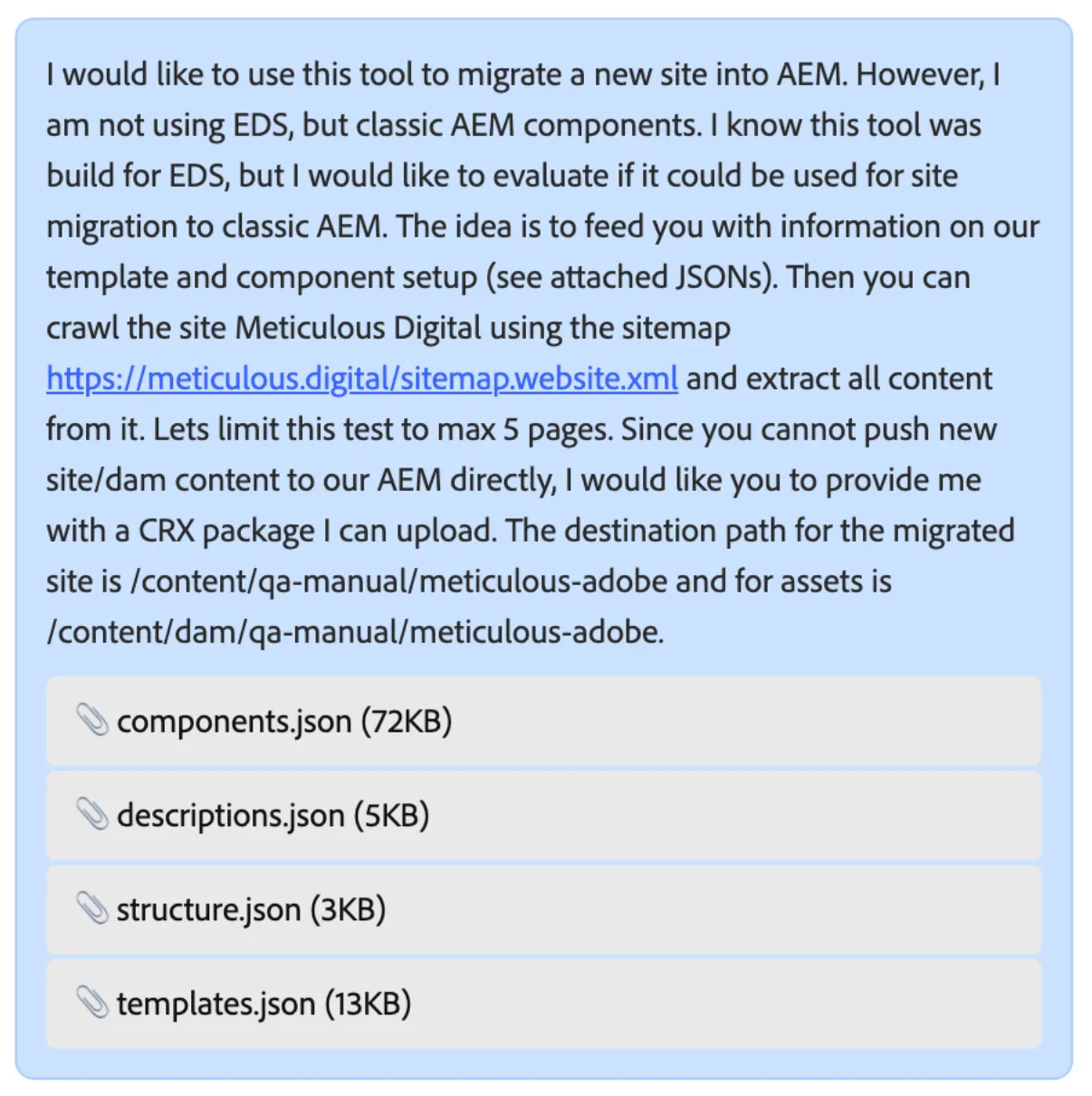
We provided the Experience Modernization Agent with the website sitemap, attached the four JSON files describing our AEM platform, and instructed it to crawl the website, extract its content, and map it to our existing templates and components. Since the objective was to evaluate the feasibility of the approach rather than perform a complete website migration, we deliberately limited the initial scope to a few pages.
The main difference compared to the intended modernization workflow was the expected output. Instead of asking the agent to create an EDS implementation, we instructed it to generate a standard AEM content package that could be manually installed into our existing AEM environment. We also provided the expected repository paths for pages, assets, and Experience Fragments.
When the AI Agent Gets Creative
One of the most interesting parts of the experiment was how the agent handled the delivery of the generated content package. Since migrating websites to classic AEM is not part of the intended workflow of the Experience Modernization Agent, there is no dedicated mechanism within this workflow for downloading a classic AEM content package. While the agent was able to generate the required JCR XML structures and assemble them into a ZIP archive, it still needed to find a way to make that archive available to us.
The solution it came up with was surprisingly creative. The agent leveraged its own website preview capabilities and exposed the generated ZIP package for download directly through the preview website, allowing us to download and manually install it using AEM Package Manager.
What makes this particularly interesting is that we did not explicitly instruct the agent to do this. It identified the capabilities available within its environment and combined them in a way that allowed it to complete a task outside the original use case of the tool. While this may not be a mechanism we would want to rely on for production migrations, it is a good example of how agentic AI can go beyond predefined workflows.
The POC Migration Results
The results were better than we initially expected, particularly considering how little preparation and custom development were required. The following diagram illustrates the entire migration process.
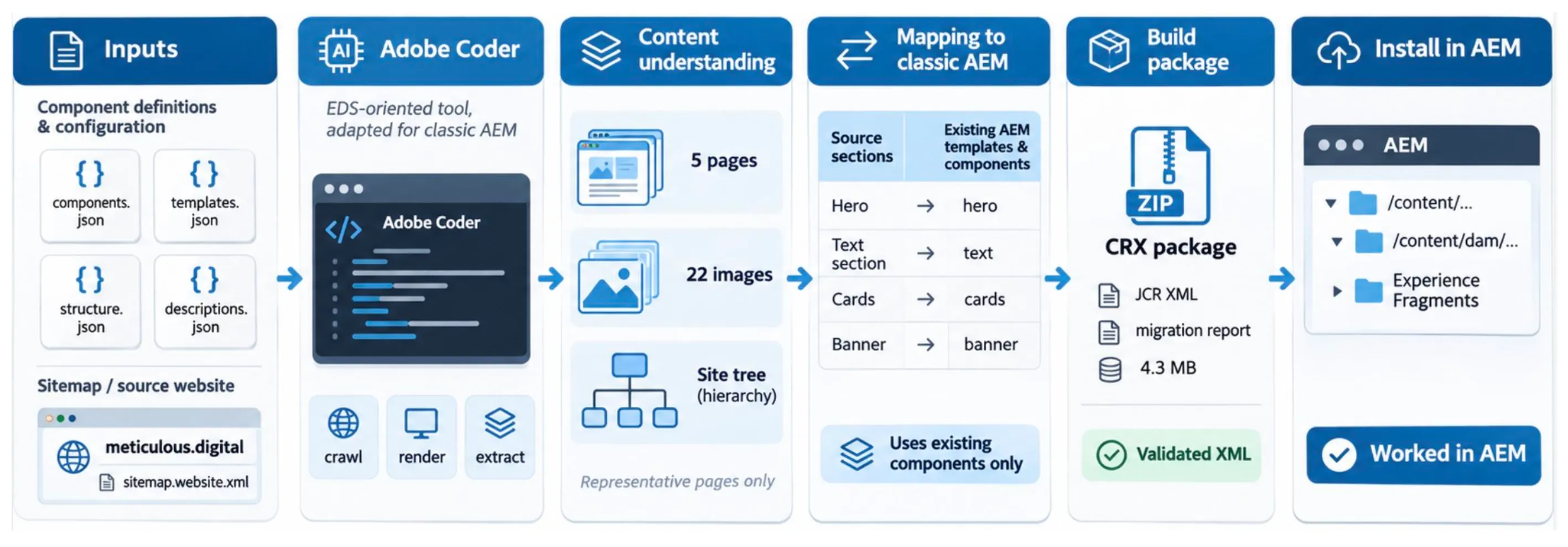
The agent was able to:
- Crawl the source website and extract its content and images
- Recreate the page hierarchy within the target AEM platform
- Map pages and content to existing AEM templates and components
- Generate header and footer Experience Fragments
- Migrate images and update asset references and internal links
- Generate valid JCR XML structures and assemble them into an installable AEM content package
- Produce a migration report documenting unsupported content
The generated content package was successfully installed into the target AEM environment, and the migrated pages rendered successfully using the existing AEM implementation. The agent did not need to develop new components or introduce additional application code. Instead, it generated content that could be consumed by the templates and components already deployed within the platform.
Of course, the migrated content still requires editorial review, and not every content structure on the source website will necessarily have a suitable equivalent within the target component library. However, starting with an already populated website that requires some manual adjustments is significantly different from asking editors to rebuild every page from scratch. Before installing AI-generated content packages, it is also important to validate package filters and destination paths to avoid unintended content overwrites.
Can This Be Used for Real AEM Site Migrations?
The short answer is yes, but with some limitations. The main advantage of leveraging Adobe's Experience Modernization Agent is that it requires minimal custom development. The capabilities needed to crawl websites, extract content, understand content structures, and intelligently map them to existing components are already available.
However, while the approach is relatively straightforward for an experienced AEM developer, it is not particularly editor-friendly. Preparing JSON definitions, interacting with the agent through prompts, reviewing the generated JCR structures, and manually installing content packages requires technical knowledge. There is also the question of predictability and control, particularly when migrating larger websites. We want to be able to validate individual migration steps, review intermediate results, adjust proposed mappings, and ensure that the generated content consistently follows the conventions of our AEM platform. Moreover, we are leveraging Adobe's tool outside its intended use case, rather than through a dedicated, officially supported classic AEM migration workflow.
Building a Custom AI-Assisted Migration Tool for AEM
To address these limitations, we also explored building our own AI-assisted migration tool using Claude APIs. Rather than relying on a conversational interface to perform the entire migration, we broke the process into a series of well-defined steps. AI is leveraged where it provides the most value, particularly when understanding source content and mapping it to existing AEM templates and components, while activities such as validation and content import are handled programmatically.
The initial proof of concept was implemented by a single developer in just two days, using command-line scripts designed to be exposed through APIs and eventually integrated into a dedicated AEM user interface.
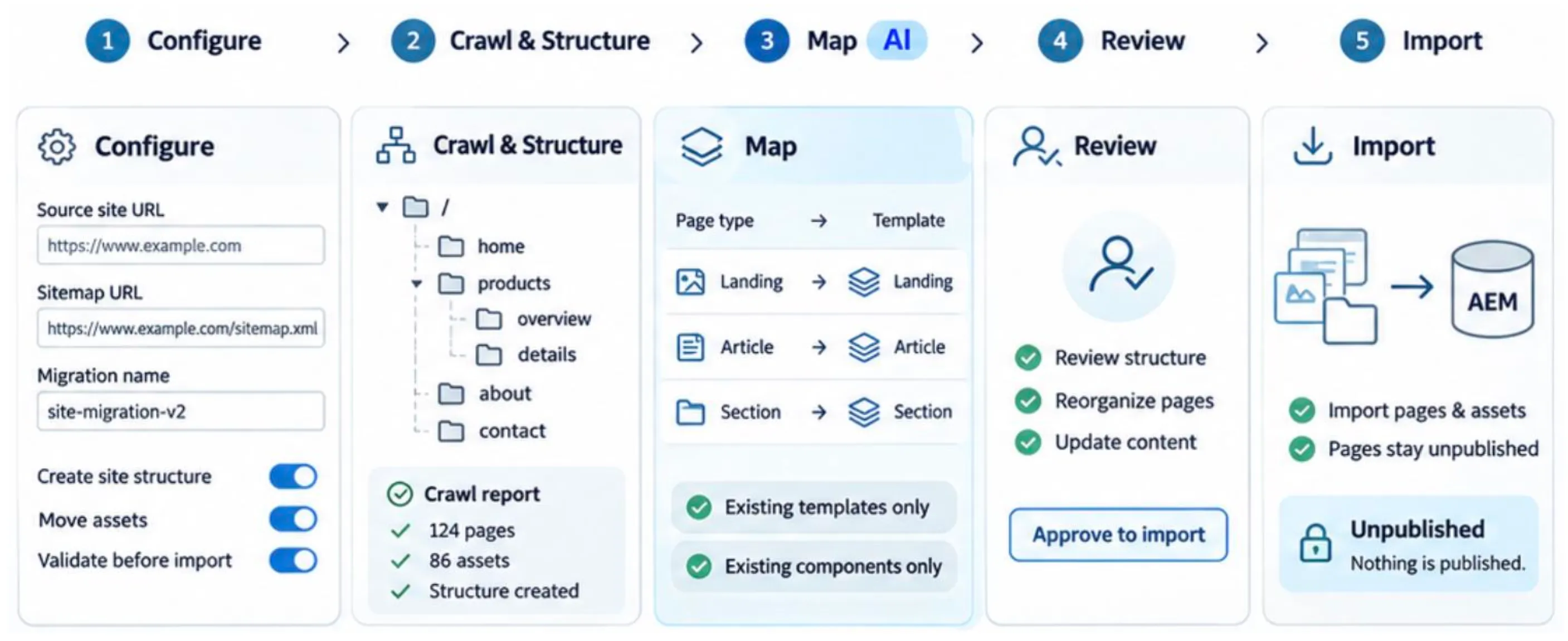
The idea is to allow editors to configure a migration, review the discovered site structure, adjust the proposed mappings, and approve the generated content before it is imported into AEM. The migrated pages would remain unpublished, allowing editors to further review and refine the content using the familiar AEM authoring experience.
While Adobe's solution provides an opportunity to leverage existing AI capabilities with minimal development effort, a dedicated migration tool can provide greater predictability, better integration, and a more editor-friendly experience.
Conclusion
Adobe's Experience Modernization Agent was built primarily for Edge Delivery Services, but some of its most valuable capabilities are not inherently tied to EDS. By providing the agent with a machine-readable description of our AEM platform and changing the expected output from an EDS implementation to a standard AEM content package, we were able to successfully migrate content to a classic AEM implementation with minimal development effort.
There is also a broader architectural lesson here. As AI agents become increasingly capable of performing content operations, having well-defined templates, reusable components, consistent content structures, and machine-readable descriptions of an existing platform becomes even more valuable. Rather than asking AI to continuously generate new implementations, we can use it to make better use of the capabilities that already exist within our platforms.
Website migration is just one example of how AI can simplify repetitive activities within AEM. At Meticulous Digital, we help organizations identify and implement practical AI use cases across content management, development, and platform operations.