Leveraging AI Translation Tools in AEM: Example using DeepL
 Daniel Strmečki
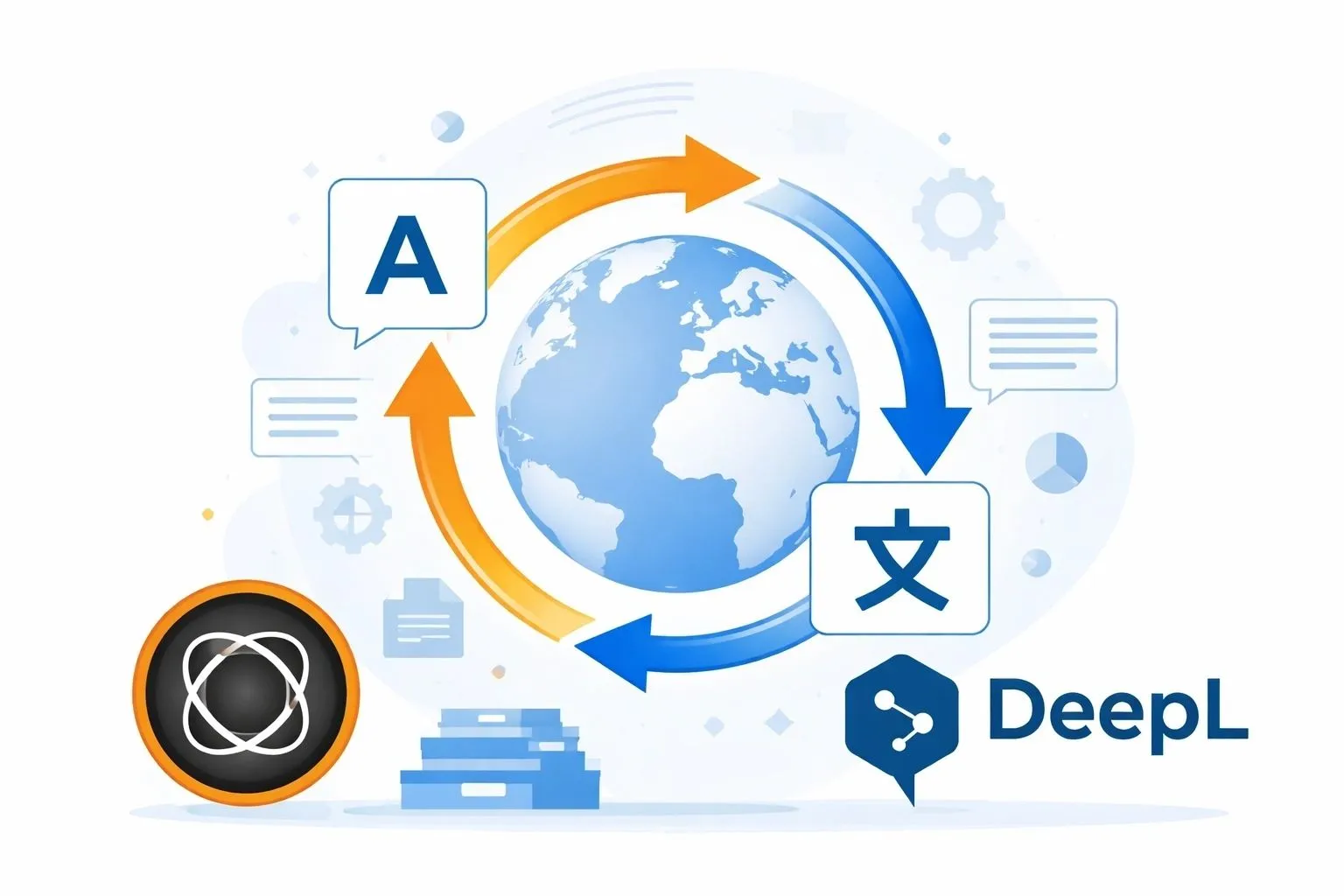
AI-powered translation has undergone significant improvements over the past few years. What once produced awkward, literal results has evolved into language output that is often remarkably fluent and context-aware. For many use cases, modern AI translations are already close to perfect.
Still, close to perfect is not the same as ready to publish. Brand tone, domain-specific wording, legal nuances, and SEO considerations mean that manual review is still required before publication. The real breakthrough of AI translation is therefore not full automation, but the speed gains. Modern AI translation tools enable teams to generate high-quality drafts in seconds instead of days, shifting human effort from translation to review and refinement.
For Adobe Experience Manager (AEM) projects, especially large multi-language enterprise websites, this change has a massive impact as it can save significant time.
Why AI Translation Makes Sense in AEM
Traditional AEM translation workflows are often slow and expensive. They involve exporting content, sending it to external translation vendors or Translation Management System (TMS) platforms, waiting for turnaround, and then re-importing content back. This process works well, but it does not scale well when content changes frequently.
AI translation tools offer a different approach. They allow translations to happen directly inside AEM, programmatically and on demand. This makes it possible to translate entire pages almost instantly, reduce operational overhead, and significantly shorten time-to-market for localized content. Authors remain in control, but they no longer need to wait for days. Surprisingly, author feedback on some of my projects after introducing AI translations was that they even do a better job than the manual translations provided by external vendors.
Integrating AI Translation into AEM
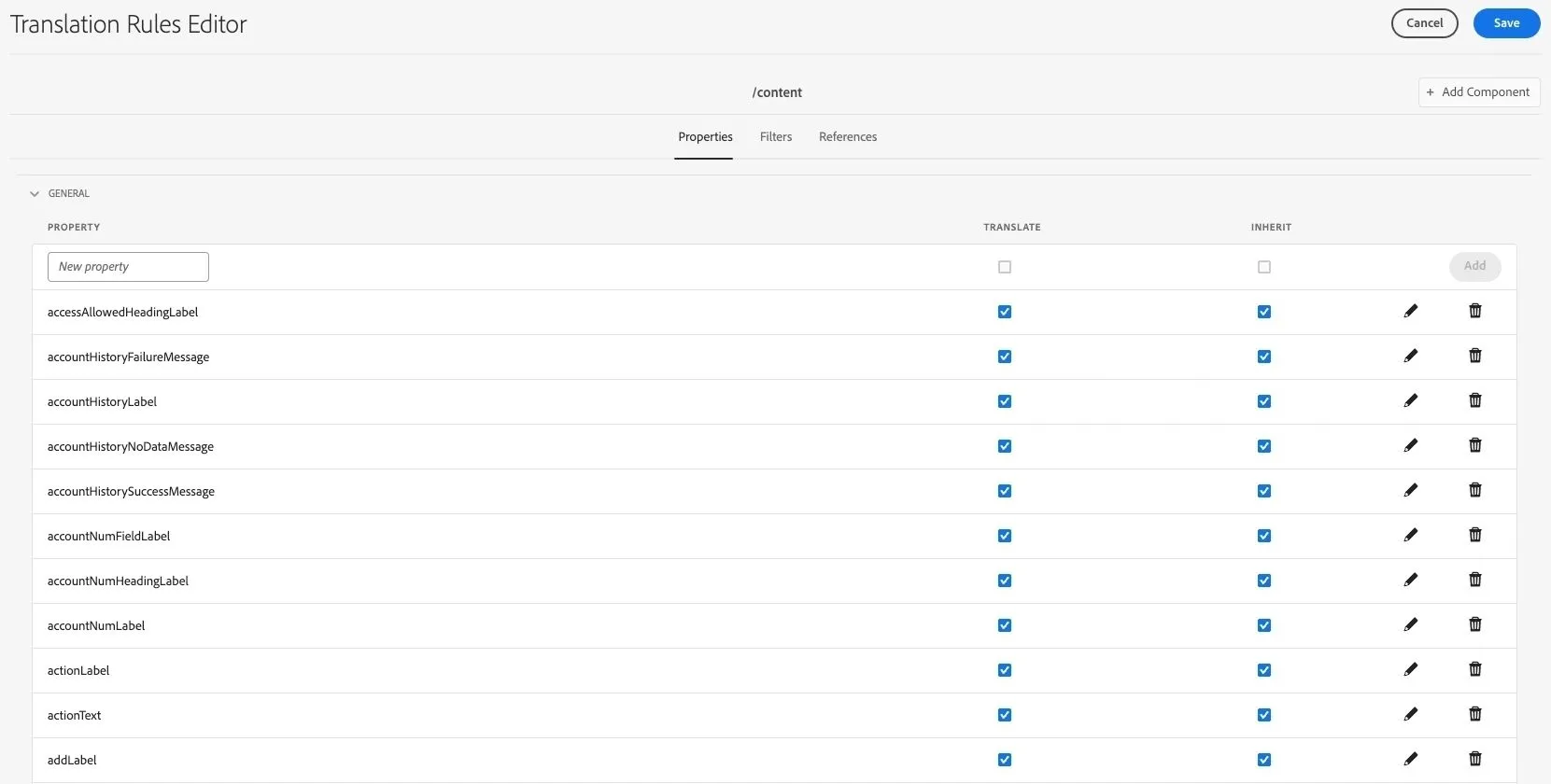
A key advantage of AEM is that it already contains the information needed to perform accurate translations. Page properties and component dialog fields can be marked as translatable, and AEM uses this information internally for its own translation workflows. The Translation Rules Editor is available out of the box in AEM and can be accessed either via Tools → General or directly using the URL: /libs/cq/translation/translationrules/contextproperties.html?context=/content.
Instead of reinventing the wheel, we can leverage this existing configuration. The idea is simple: take the translatable property definitions, compare them against the actual content structure of a page and its components, and build a complete list of values that should be translated. This approach avoids hardcoding component logic and works consistently across sites, regardless of how many components or templates are involved.
Extracting Translatable Content from a Page
The first implementation step is to traverse the page’s content tree and identify all properties that are marked as translatable. By combining AEM’s translatable property configuration with the actual component data, we can reliably extract every string that needs translation, including deeply nested component properties.
This method respects authoring intent and scales naturally as new components are added. In the example code below, we leverage AEM’s Translation Rules configuration as the single source of truth. The implementation loads the translation rules XML, traverses its node hierarchy, and builds an in-memory model of all properties that are marked as translatable, including optional constraints such as resource type or path matching. The result is a normalized list of translatable properties that can later be matched against the actual page content tree.
final List<TranslatableProperty> translatableProperties = new ArrayList<>();

private void loadTranslationRules() {
    final String TRANSLATION_RULES_PATH = "/conf/global/settings/translation/rules/translation_rules.xml";
    final Resource translationRulesResource = resolver.getResource(TRANSLATION_RULES_PATH);
    try (final InputStream inputStream = translationRulesResource.adaptTo(InputStream.class)) {
        final DocumentBuilderFactory factory = DocumentBuilderFactory.newInstance();
        final DocumentBuilder builder = factory.newDocumentBuilder();
        final Document document = builder.parse(inputStream);
        this.parseTranslationRules(document);
    }
}

private void parseTranslationRules(final Document document) {
    final Element rootElement = (Element) document.getElementsByTagName("nodelist").item(0);
    this.processNodes(rootElement);
}

private void processNodes(final Element parent) {
    final List<Element> nodeList = this.getDirectChildrenByTagName(parent, "node");
    for (final Element node : nodeList) {
        final String path = node.getAttribute("path");
        final String pathContains = node.getAttribute("pathContains");
        final String resourceType = node.getAttribute("resourceType");
        this.extractTranslatableProperties(node, path, pathContains, resourceType);
        this.processNodes(node);
    }
}

private void extractTranslatableProperties(final Element node, final String path, final String pathContains, final String resourceType) {
    final List<Element> propertyList = this.getDirectChildrenByTagName(node, "property");
    for (final Element property : propertyList) {
        final String name = property.getAttribute("name");
        final String translate = property.getAttribute("translate");
        if (StringUtils.isNotBlank(name)) {
            final String effectivePath = StringUtils.isBlank(path) ? this.findParentPath(node) : path;
            final TranslatableProperty translatableProperty = TranslatableProperty.builder()
                    .path(effectivePath)
                    .pathContains(StringUtils.isNotBlank(pathContains) ? pathContains : null)
                    .resourceType(StringUtils.isNotBlank(resourceType) ? resourceType : null)
                    .propertyName(name)
                    .translate("true".equals(translate))
                    .build();
            this.translatableProperties.add(translatableProperty);
        }
    }
}
Translating Content with DeepL
Once the list of translatable strings is prepared, the content can be sent to an AI translation service such as DeepL. We chose DeepL because of its consistently high translation quality, especially for European languages, and its straightforward, developer-friendly API that integrates cleanly with any backend system, like AEM.
DeepL offers both free and paid APIs. One important detail when integrating it into AEM is that the API base URL differs depending on which plan you use. This is something that should be handled via a project/site-level configuration property, so the integration can easily switch between the free and paid DeepL endpoints without requiring a code deployment. All extracted strings can be sent in a single API request. In practice, translating a full AEM page, including all component content, usually takes less than a second.
In the code example below, the DeepL request makes use of XML tag handling to keep full control over what gets translated and how formatting is preserved. The text parameter contains the generated XML document with all translatable values, while target_lang defines the desired target language. By enabling tag_handling=xml, DeepL is instructed to treat the input as structured XML rather than plain text. The splitting_tags parameter allows translation to occur only inside specific tags; in our case, <t> is used for plain text and <h> for HTML content. Tags marked as <nt> are explicitly ignored via ignore_tags, making it possible to embed non-translatable values such as identifiers.
Additional parameters, such as preserve_formatting ensure that line breaks and spacing are kept intact, while disabling outline_detection prevents DeepL from applying document-level structure analysis that could otherwise interfere with component-based content. Each translatable value is wrapped in a custom XML tag that includes the original JCR path and property name as attributes (jcrPath and jcrProperty). These attributes are ignored by DeepL during translation, but they survive the round-trip and allow the translated text to be mapped back precisely to its original location in the repository.
public TranslationResponse requestTranslation(final List<TranslatablePropertyValue> translatableProperties, final String targetLanguage,
            final String apiKey,
            final boolean useFreePlan) {
    final String apiUrl = useFreePlan ? "https://api-free.deepl.com/v2/translate" : "https://api.deepl.com/v2/translate";
    final String xmlContent = this.buildDeepLXml(translatableProperties);
    final HttpPost httpPost = new HttpPost(apiUrl);
    httpPost.setHeader("Authorization", this.deeplAuthPrefix + apiKey);
    final List<NameValuePair> formParams = getDeeplFormParams(targetLanguage, xmlContent);
    httpPost.setEntity(new UrlEncodedFormEntity(formParams, StandardCharsets.UTF_8));
    return this.getTranslationResponse(httpPost);
}

private String buildDeepLXml(final List<TranslatablePropertyValue> translatableProperties) {
    final StringBuilder xmlBuilder = new StringBuilder();
    xmlBuilder.append("<doc>");
    for (final TranslatablePropertyValue property : translatableProperties) {
        if (StringUtils.isNotBlank(property.getPropertyValue())) {
            // Determine tag type: use 't' for plain text, 'h' for HTML content, 'nt' for non-translatable content
            String tagType = "t";
            if (this.containsHtml(property.getPropertyValue())) {
                tagType = "h";
            }
            xmlBuilder.append(String.format(
                    "<%s jcrPath=\"%s\" jcrProperty=\"%s\">%s</%s>",
                    tagType,
                    property.getPath(),
                    property.getPropertyName(),
                    property.getPropertyValue(),
                    tagType));
        }
    }
    xmlBuilder.append("</doc>");
    return xmlBuilder.toString();
}

private TranslationResponse getTranslationResponse(final HttpPost httpPost) throws IOException {
    try (final CloseableHttpResponse response = this.httpClient.execute(httpPost)) {
        final String responseBody = IOUtils.toString(response.getEntity().getContent(), StandardCharsets.UTF_8);
        final int statusCode = response.getStatusLine().getStatusCode();
        final JsonObject jsonResponse = JsonParser.parseString(responseBody).getAsJsonObject();
        if (jsonResponse.has("translations") && jsonResponse.getAsJsonArray("translations").size() > 0) {
            final JsonObject translation = jsonResponse.getAsJsonArray("translations").get(0).getAsJsonObject();
            final String translatedText = translation.get("text").getAsString();
            return TranslationResponse.builder().statusCode(statusCode).translations(translatedText).build();
        } else {
            return TranslationResponse.builder().statusCode(statusCode).errorMessage("No translations found in response").build();
        }
    }
}

private static List<NameValuePair> getDeeplFormParams(final String targetLanguage, final String xmlContent) {
    final List<NameValuePair> formParams = new ArrayList<>();
    formParams.add(new BasicNameValuePair("text", xmlContent));
    formParams.add(new BasicNameValuePair("target_lang", targetLanguage));
    formParams.add(new BasicNameValuePair("tag_handling", "xml"));
    formParams.add(new BasicNameValuePair("splitting_tags", "t,h"));
    formParams.add(new BasicNameValuePair("ignore_tags", "nt"));
    formParams.add(new BasicNameValuePair("preserve_formatting", "1"));
    formParams.add(new BasicNameValuePair("outline_detection", "false"));
    return formParams;
}
Writing Translations Back into AEM
After receiving the translated content back from DeepL, the final step is mapping each translated value to its original property path and persisting it in the JCR. At this point, the translated page is fully populated and ready for author review. From an author’s perspective, this feels almost instantaneous. A page is translated, saved, and available for refinement without any manual copy-paste or external tooling.
In the code sample below, the response from DeepL is processed as structured XML, allowing each translated fragment to be handled independently. As every element still carries its original jcrPath and jcrProperty attributes, the translated content can be written back deterministically to the correct resource and property, regardless of component structure or ordering.
public void storeTranslation(final String xmlResponse, final ResourceResolver resolver) {
    final String cleanedXml = sanitizeHtmlWithinXml(xmlResponse);
    final DocumentBuilderFactory factory = DocumentBuilderFactory.newInstance();
    factory.setFeature(XMLConstants.FEATURE_SECURE_PROCESSING, true);
    final DocumentBuilder builder = factory.newDocumentBuilder();
    final Document document = builder.parse(new InputSource(new StringReader(cleanedXml)));
    final NodeList tNodes = document.getElementsByTagName("t");
    final NodeList hNodes = document.getElementsByTagName("h");
    final NodeList[] nodeLists = { tNodes, hNodes };
    final boolean allUpdatesSuccessful = this.processAllTranslationElements(resolver, nodeLists);
    if (resolver.hasChanges() && allUpdatesSuccessful) {
        resolver.commit();
    }
}

private void processAllTranslationElements(final ResourceResolver resolver, final NodeList[] nodeLists) {
    for (final NodeList nodeList : nodeLists) {
        for (int i = 0; i < nodeList.getLength(); i++) {
            final Node node = nodeList.item(i);
            if (node.getNodeType() != Node.ELEMENT_NODE) {
                continue;
            }
            final Element element = (Element) node;
            this.processTranslationElement(element, resolver);
        }
    }
    return allUpdatesSuccessful;
}

private boolean processTranslationElement(final Element element, final ResourceResolver resolver) {
    final String jcrPath = element.getAttribute("jcrPath");
    final String jcrProperty = element.getAttribute("jcrProperty");
    final Resource resource = resolver.getResource(jcrPath);
    final ModifiableValueMap valueMap = resource.adaptTo(ModifiableValueMap.class);
    this.liveCopyInheritanceService.cancelInheritance(resource, jcrProperty);
    final String translatedContent = this.innerXml(element);
    valueMap.put(jcrProperty, translatedContent);
}
Live Copies and Inheritance
In case our AEM setup uses Live Copies, there is one critical step that shouldn't be overlooked. After translating content on a live copy, inheritance needs to be broken. If inheritance remains intact, future rollouts from the source language can overwrite the translated content. Breaking inheritance ensures that localized content remains stable and editable, and that translation work is not lost.
Live Copy inheritance can be cancelled at different levels, depending on how the translated content is structured. For component-based content, inheritance is cancelled by adding the cq:LiveSyncCancelled mixin and explicitly disabling inheritance for child nodes using cq:isCancelledForChildren boolean property. This ensures that translated component content is fully detached from the source language and protected from future rollouts.
Page-level properties, on the other hand, are handled differently, using the cq:propertyInheritanceCancelled mechanism. By cancelling inheritance at the property level, only the specific translated fields are detached, while the rest of the page can continue to inherit structural or configuration changes from the source. This selective approach provides fine-grained control and avoids unnecessary divergence between live copies.
private void cancelLiveCopyInheritanceForComponent(final Resource componentResource) {
    final LiveRelationship rel = this.liveRelationshipManager.getLiveRelationship(componentResource, false);
    if (rel != null) {
        final javax.jcr.Node node = componentResource.adaptTo(javax.jcr.Node.class);
        if (node != null) {
            if (!node.isNodeType("cq:LiveSyncCancelled")) {
                node.addMixin("cq:LiveSyncCancelled");
            }
            node.setProperty("cq:isCancelledForChildren", true);
        }
    }
}

private void cancelLiveCopyInheritanceForPageProperty(final Resource pageContent, final String propertyName) {
    final ModifiableValueMap valueMap = pageContent.adaptTo(ModifiableValueMap.class);
    final String[] existing = valueMap.get("cq:propertyInheritanceCancelled", String[].class);
    final List<String> cancelled = new ArrayList<>();
    if (existing != null) {
        cancelled.addAll(Arrays.asList(existing));
    }
    if (!cancelled.contains(propertyName)) {
        cancelled.add(propertyName);
        valueMap.put("cq:propertyInheritanceCancelled", cancelled.toArray(new String[0]));
    }
}
Conclusion
AI translation has reached a level of quality where it can be safely integrated into everyday AEM workflows, as long as manual review remains a part of the publishing process. By leveraging AEM’s existing translatable property configuration and combining it with fast AI translation services like DeepL, it is possible to build a translation workflow that is both scalable and predictable.
Because this translation approach is lightweight and API-driven, it performs extremely well. There are no long-running workflows or external TMS round-trips involved, and translations can be generated on demand, even for complex pages. In real-world projects, the translation step itself is rarely the bottleneck anymore; author review is, but that is exactly where human effort provides the most value.
AI cannot fully replace editors, but it can fundamentally change how editor work is done. By removing friction and manual overhead, it significantly reduces the time and cost required to get localized content ready for review. For large-scale AEM implementations, that combination is hard to ignore. If you’re exploring AI-driven optimizations in AEM or want to assess whether this translation approach would fit your setup, feel free to reach out.